
Brew up a website coffee lovers will adore.
A strong coffee shop website puts the drink menu, hours, and location up front, then tells the story of your beans and your space. Building a site on We.Inc is free: no card and no trial are needed to start. AI building and edits come with Starter at $20 a month.
A coffee shop website has one job: show your drinks, your hours, and why your cup is worth the detour. Describe your shop and we.inc builds it.
Pages every coffee shop website needs
- Home: A great photo of the bar or a pour, today's hours, and your address. Most visitors are deciding whether to walk over right now.
- Menu: Espresso drinks, drip, pour-over, seasonal specials, milk options, and any pastries. Real text, not a photo of the chalkboard, so it reads on a phone and in search.
- Our Coffee: Where your beans come from, who roasts them, and the origins on rotation. Specialty coffee drinkers care, and it separates you from chains.
- About & Space: Seating, Wi-Fi, outlets, and whether laptops are welcome. Remote workers search for exactly this.
- Wholesale or Events: If you sell beans to offices or host cuppings, a short page with an inquiry form turns that into steady revenue.
- Visit Us: Map, parking, and hours for every location. Keep holiday hours updated.
Try this prompt
A website for Low Tide Coffee, a specialty espresso bar in Portland, Maine. Pages for our drink menu with seasonal lattes, a page about our single-origin beans from a local roaster, a laptop-friendly space section, a wholesale inquiry form for offices, and our hours and map. Minimal, warm look with charcoal, oat, and copper.
What should a coffee shop say about its beans?
Where they come from, who roasts them and what they taste like. If you roast in-house or work with a local roaster, say so and name the current single origins with tasting notes. Regulars like knowing what is on the grinder this month. If you sell bags, list them with roast dates and take payment through your own Stripe account, or simply say they are available at the counter.
Should I mention Wi-Fi, outlets and seating on the site?
Yes, because remote workers and students search for exactly that. Say whether you have Wi-Fi, roughly how many seats, whether there are outlets and any laptop rules at busy times. Parents want to know about pram space and toilets; groups want to know if you take large tables. A few honest lines save people from arriving to find the place is not what they needed.
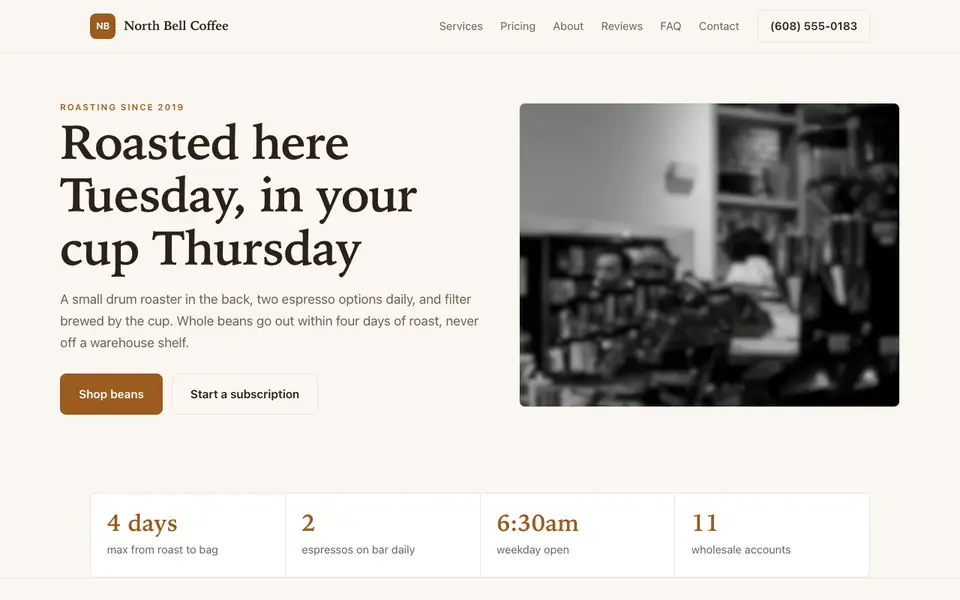
North Bell Coffee
This is North Bell Coffee, a coffee shop business we described to the AI in a sentence. See the North Bell Coffee example site.
Start from this design
Three designs that suit a coffee shop website.
- Warm Dark Coffee Roastery
- Teal Cold-Pressed Juice Bar
- Daily-Batch Artisan Bakery
Attract customers with a warm, inviting site that showcases your specialty drinks and cozy atmosphere.
A coffee shop website designed around your actual services and prices, not a stock layout. Describe the business and the AI writes and builds every page.
Features designed for your industry
- Drink Menu: Display your espresso drinks, cold brews, and specialty items.
- Loyalty Programs: Promote your rewards program and gift cards.
- Find Us: Help customers locate your shop with maps and hours.
Perfect for:
- Specialty coffee shops
- Espresso bars
- Drive-thru coffee
- Coffee roasters
- Third-wave cafes
Hours are the most-read thing on your site
Put today's hours on the home page and keep them identical to your Google Business Profile. A closed door after the site said 'open' costs you a regular.
Tell the bean story briefly
One short paragraph per origin, roast level, and tasting notes is plenty. It gives people a reason to choose you over the drive-through and helps if you sell bags retail.
Say whether you are a work spot
Wi-Fi, outlets, and laptop policies are real search terms. State them clearly, including any weekend no-laptop hours, so expectations match.
Order-ahead and loyalty live in your POS
The AI can build a bean shop with checkout through your own Stripe account, but we.inc is not a POS: no order-ahead queue to the bar, loyalty points, or inventory. Link your Square or Toast ordering page for mobile orders.
What it costs
Costs stay small: a domain for about $10 to $20 a year if you want your own name, which requires a paid plan. Building a site on We.Inc is free, with no card needed to start; Starter at $20 a month adds AI so updating a seasonal menu is a one-line request.
Building your site is free, no card needed. Paid plans from $20 a month. Compare plans
Frequently asked questions
What is the best website builder for coffee shops?
One that makes the menu, hours, and location easy to update. We.inc builds all three from a description, and changes like a new seasonal drink take a sentence to the AI on a paid plan.
Can customers order coffee ahead from my site?
We.inc is not a point-of-sale system, so drink orders sent to your bar should come through your POS. Link its order-ahead page, such as Square or Toast, and the button sits right on your menu.
Do I need a website if I have Instagram?
Instagram is great for photos, but people searching 'coffee near me' land on websites and Google listings. A site with real menu text and hours shows up in search in ways a feed does not.
Is it free to start?
New We.Inc accounts can build a site free, with no card needed to start. When you want the AI writing and editing, Starter costs $20 a month.
Can I show more than one location?
Yes. The AI can build a locations page with hours, maps, and details for each shop.
Browse the templates: Restaurant website templates
Related industries and website guides
- restaurant website builder
- bakery website builder
- catering website builder
- food trucks website builder
- meal prep business websites
- pizzerias website builder
- coffee shops website examples
- how to make a website
Related website builders: Food & Hospitality
- restaurant website builder
- bakery website builder
- catering website builder
- food trucks website builder
- meal prep business websites
- pizzerias website builder
Before you start
Product
Who It's For
- For Agencies
- For Freelancers
- For Hosting Providers
- For SaaS Platforms
- For Startups
- For Financial Services
- For Healthcare
Features
Resources
- Blog
- Help Center
- Free Business Tools
- Free UI Components
- Website Templates
- Template Collections
- Website Examples
- Guides
- Comparisons
- Alternatives
- Best Lists
- Reviews
- Pricing Guides
- Use Cases
- Glossary & Guides
- Integrations
- Developers
- Benchmark
- Windows App