
Convert visitors into subscribers.
A SaaS marketing site has to make the product legible in one scroll: who it is for, the job it does, what it looks like in use and what it costs. The pages that earn their keep are product or feature pages, pricing with plan comparison, integrations, customer stories you can actually attribute, security and a demo or trial path. We.inc's AI builds the marketing site; your app, signup and billing stay in your own product.
Drive signups with a high-converting site showcasing your software's features and benefits.
Pages every saas company website needs
- Home: A specific headline about the outcome, a product screenshot or short loop and a single primary call to action, trial or demo.
- Product / Features: Pages built around use cases or jobs-to-be-done rank for the problems buyers search, rather than internal feature names.
- Pricing: Plans, what is included, seat or usage limits and an FAQ below the table answer the question most visitors came to settle.
- Integrations: B2B buyers check whether you connect to the tools they already use before booking a demo.
- Security & Trust: Data handling, hosting region, SSO support and any real certifications give procurement teams a page to forward.
- Book a Demo / Start Trial: A demo request form capturing company size and use case, or a link to your app's signup, is the conversion point for every page.
Try this prompt
Build a marketing site for Shiftwise, a scheduling SaaS for multi-location restaurant groups, based in Chicago, Illinois. Include a home page with product screenshots, feature pages for shift swaps, labor cost forecasting and payroll export, a pricing page with Starter, Growth and Enterprise plans billed per location, an integrations page, a security page, a changelog, and a demo request form that asks for number of locations and current scheduling tool.
Palletwise
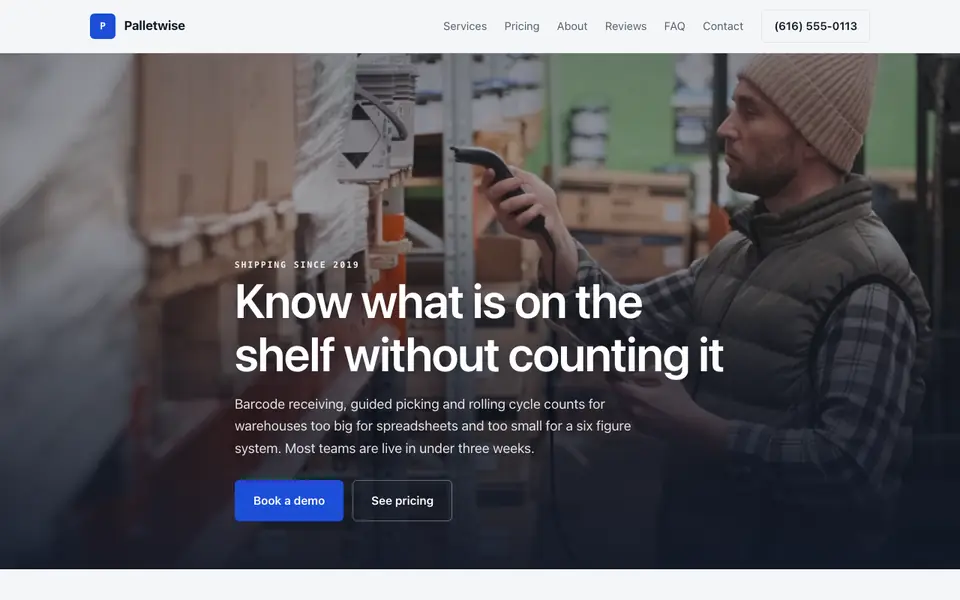
This is Palletwise, a saas company business we described to the AI in a sentence. See the Palletwise example site.
Start from this design
Three designs that suit a saas company website.
- Black & Violet SaaS Hero
- Dark SaaS Pricing Table Section
- Dark DevOps Release Platform
Most saas company sites are a template with the name swapped in. Describe what you do and the AI designs and writes a saas company website around that business instead.
Features designed for your industry
- Features: Showcase your software features with screenshots.
- Pricing: Display transparent pricing tiers.
- Free Trial: Drive signups with free trial CTAs.
Perfect for:
- B2B SaaS
- B2C SaaS
- Enterprise software
- Productivity tools
- Developer tools
Marketing site, not the app
We.inc builds your public site. Signup, login and billing stay inside your product, so every Start trial button links to your app's signup URL. That separation also lets marketing edit copy without an engineering deploy.
Honest proof only
Customer logos, quotes and case study numbers should come from customers who agreed to be named. Leave the section out until you have them; the AI will not invent testimonials or metrics.
Pages that feed search
Comparison pages, use-case pages and a changelog give search engines and buyers fresh, specific content. The AI can draft them, and you edit for accuracy about your own product.
Security claims need backing
Only list certifications, audits or compliance frameworks you have actually completed. A clear description of how you store and protect data is better than a badge you cannot back up.
What it costs
Building a site on We.Inc is free, with no card needed. After it, Starter at $20 a month is the first paid plan; putting it on your product's domain needs a paid plan and a domain, usually $10-20 a year if you do not already own one.
Building your site is free, no card needed. Paid plans from $20 a month. Compare plans
Frequently asked questions
Can we.inc host our app's login and signup?
No. We.inc sites do not have user accounts. Point your signup and login buttons at your own application.
Can I take subscription payments on the marketing site?
Billing for a SaaS product is normally handled inside the app. If you need a simple payment link for something like a paid pilot, it can go through your own Stripe account.
Can I add a blog and changelog?
Yes. The AI can build both, and you can add new posts by chat.
Can I edit the code?
Yes. You can edit by chat, visually or directly in code.
Can the demo form route to our CRM?
The AI-built form emails you each request. If you need submissions to land in a CRM, embed your CRM's own form or forward the emails with an automation tool.
Related industries and website guides
- SaaS website landing page builder
- membership website builder
- startup website builder
- ai & ml startups website builder
- cybersecurity companies website builder
- software development agencies website builder
- saas companies website examples
- how to make a website
Related website builders: Tech & Startups
- saas website builder
- membership website builder
- startup website builder
- ai & ml startups website builder
- cybersecurity companies website builder
- software development agencies website builder
Before you start
Product
Who It's For
- For Agencies
- For Freelancers
- For Hosting Providers
- For SaaS Platforms
- For Startups
- For Financial Services
- For Healthcare
Features
Resources
- Blog
- Help Center
- Free Business Tools
- Free UI Components
- Website Templates
- Template Collections
- Website Examples
- Guides
- Comparisons
- Alternatives
- Best Lists
- Reviews
- Pricing Guides
- Use Cases
- Glossary & Guides
- Integrations
- Developers
- Benchmark
- Windows App