Tattoo Website Design: Free Template and Examples
Tattoo website design with a free tattoo website template: the pages a studio needs, artist portfolios by style, booking and deposit rules, how to make a tattoo website step by step, costs and a launch checklist.
Browse the templates: Tattoo website templates
Short answer (September 2026): good tattoo website design puts the art first, with a portfolio for every artist grouped by style, then makes booking structured and clear: a form that asks for placement, size, style and references, plus deposit, minimum and cancellation rules on the same page. Aftercare, hygiene and licensing details build trust. Below is a page-by-page template, the must-have pages, typical costs and a launch checklist.
Looking for a tattoo website template? The page-by-page structure below works as a free tattoo website template in any builder, and Studio Ink and Sable and Iron are ready-made designs to start from. When you compare tattoo web templates, judge them on three things: a large, uncropped gallery, space for one page per artist, and a booking form that can ask for placement, size and reference images.
Build your tattoo studio website. Start from a ready-made template on the free plan (up to three published sites), or describe your studio in one prompt and let the We.Inc AI builder draft every page, available from the $20 a month Starter plan. Create your account, see what the tattoo artist website builder sets up, or start from a design: Studio Ink, Sable and Iron, Crown and Blade Barbershop.
People choose a tattoo artist by style first and studio second. They scroll portfolios, check whether the artist does what they have in mind, then look for how to book and what it costs. Your website should make that path smooth and filter out the enquiries you cannot take.
Tattoo artist website examples
These are example designs made with We.Inc, not real studios. Names and details are placeholders.

Example design: tattoo artist website. Portfolio first, dark palette, and a booking button in the header. Generated from the prompt "a website for a tattoo artist in Nashville".
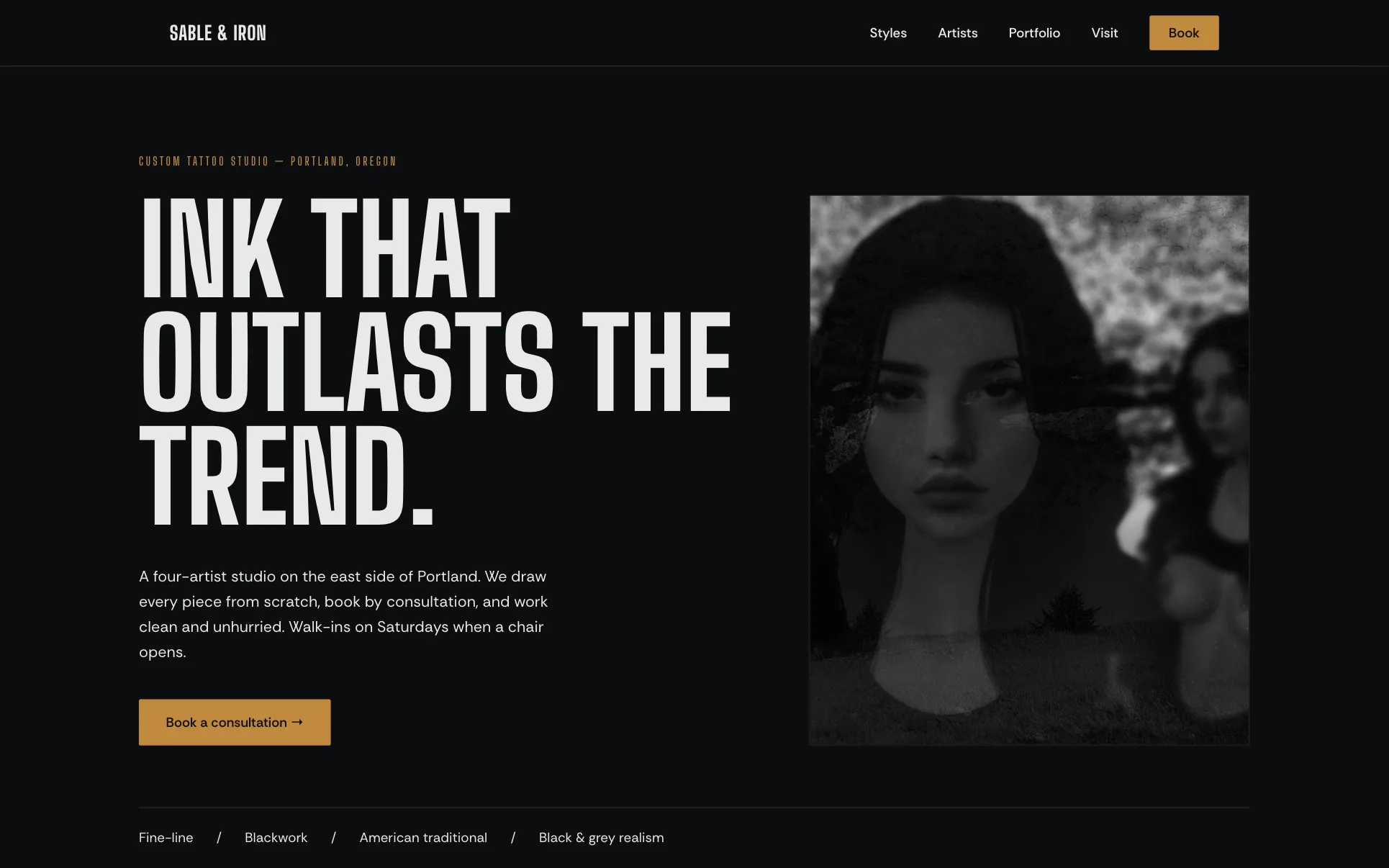
Template design: Sable and Iron. A studio layout with room for several artists.
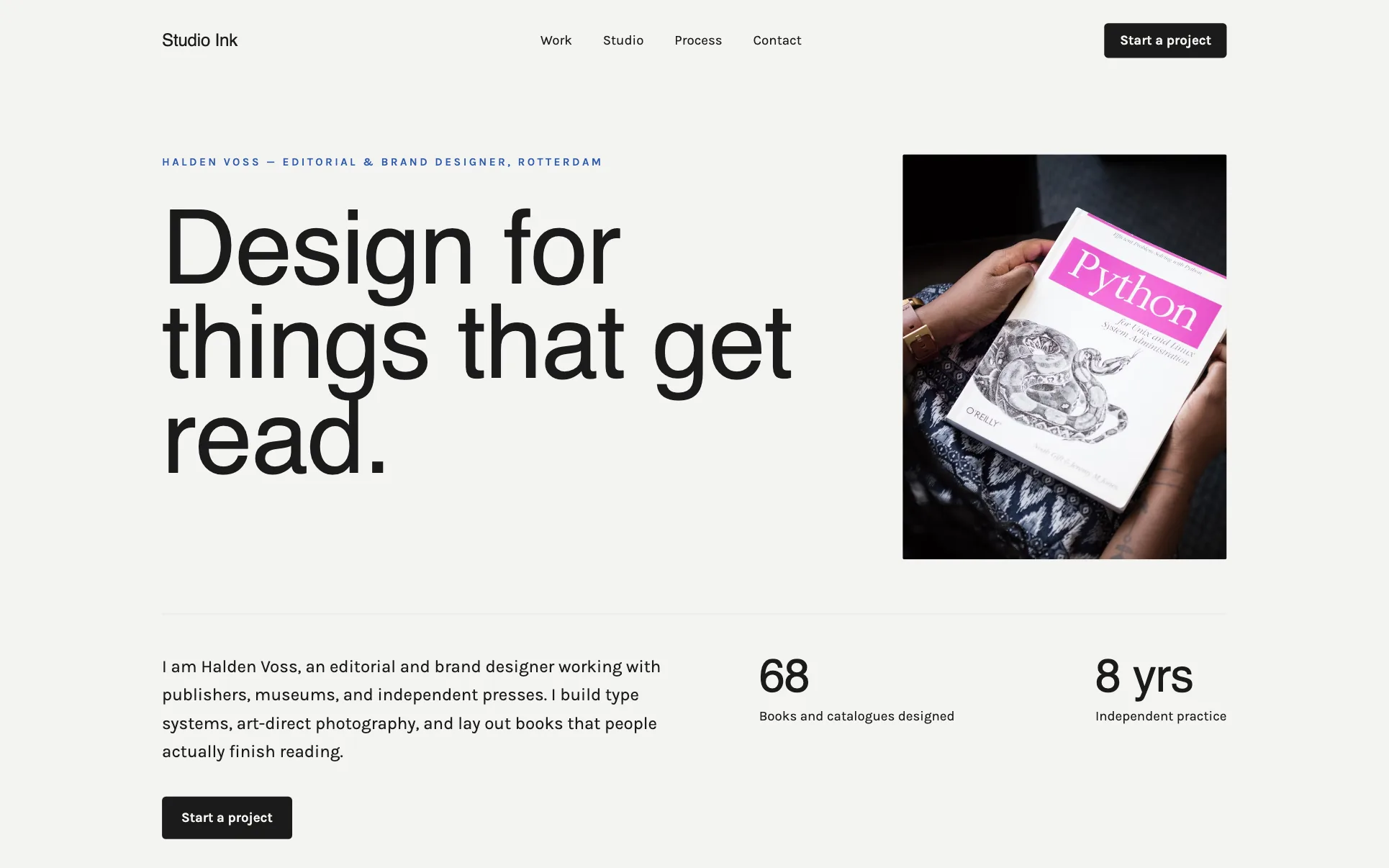
Template design: Studio Ink. A single-artist portfolio layout, a good fit for a solo tattoo artist website.
A tattoo artist website for a solo artist needs the same core as a studio site (portfolio, booking form, deposit policy, aftercare) with one artist page instead of several. Everything below applies to both.
What the best tattoo websites have in common
- Art, big and first. Large, sharp photos of healed and fresh work.
- A page per artist. Bio, styles, portfolio, booking status (books open or closed) and a booking button.
- Style organisation. Fine line, traditional, neo-traditional, realism, blackwork, lettering, cover-ups.
- A proper booking form. Idea, placement, size, colour or black and grey, references, budget, availability.
- Clear policies. Deposits, minimums, cancellations, age requirements, touch-ups.
- Aftercare and hygiene. Instructions, products you recommend, sterilisation and licensing information.
- The studio vibe. A few photos of the space so first-timers feel comfortable.
Free tattoo website template (copy this structure)
Home page
- Header: logo, Artists, Book, Instagram.
- Hero: a strong piece with "Tattoo studio in [City]" and a line on your specialities. Buttons: Book a consultation, Meet the artists.
- Artists: cards with photo, styles and books-open status.
- Featured work: a grid of recent pieces.
- How booking works: enquiry, consultation, deposit, session, aftercare.
- Walk-ins or flash days if you run them.
- Reviews, hours and location.
Artist page (one per artist)
- H1: "[Name], [Style] Tattoo Artist in [City]"
- Bio and specialities
- Portfolio grouped by style
- Books status and typical wait
- Booking button pre-filled with that artist
Booking, policies, aftercare and contact
- Booking: structured enquiry form with reference upload
- Policies: deposits, minimums, cancellations, rescheduling, ID and age rules
- Aftercare: step-by-step healing instructions
- Contact: address, hours, parking, email
How to make a tattoo website in 6 steps
- Choose the shape. A solo artist needs one portfolio and one booking form. A studio needs a page and a booking route for each artist, so clients book the right person.
- Pick the work. Select 20 to 40 of your strongest healed pieces per artist, photographed in good light and grouped by style. Leave out anything you would not want to tattoo again.
- Choose a template whose gallery keeps images large and uncropped on phones, where most clients will see it.
- Write your rules first: shop minimum, deposit, rescheduling, age and ID policy. The booking form should match them.
- Build the pages: home, artist pages, booking, aftercare, FAQ and contact with hours and a map.
- Test and connect. Send yourself a booking with a reference image from your phone, connect your domain, then link the site from your Instagram bio and Google Business Profile.
Must-have pages for a tattoo studio website
| Page | What goes on it | Must-have? |
|---|---|---|
| Home | Featured art, artists, booking steps, location | Yes |
| Artist pages | Bio, styles, portfolio, books status, booking | Yes |
| Portfolio by style | Grouped galleries | Recommended |
| Booking | Structured enquiry form with reference uploads | Yes |
| Policies and pricing | Deposits, minimums, cancellation, age and ID rules | Yes |
| Aftercare | Healing steps, products, when to contact you | Yes |
| Flash and walk-ins | Available flash, walk-in days | If you offer them |
| Guest artists | Dates, styles, booking | If you host guests |
| Contact | Address, hours, parking | Yes |
Writing copy that attracts the right clients
- Write in your studio's voice. Relaxed, precise, welcoming, whatever you are in person.
- Tell people what you do not do. "We don't copy other artists' work" or "No hand or face tattoos as a first piece" sets expectations.
- Explain the process. First-timers want to know how consultations, stencils and sessions work.
- Be clear about money. Minimum, deposit and how quotes are given.
- Keep booking instructions simple and repeated.
Designing the booking form
The booking form is the most important piece of a tattoo website after the portfolio. A good one saves hours of back-and-forth messages and helps artists quote accurately:
- Artist choice first, or "no preference" for studios that match clients to artists.
- Idea description in a text box with a short prompt: "Tell us what you want, the style and any meaning behind it."
- Placement and approximate size, with a simple body diagram or dropdown and a size in inches or centimetres.
- Colour or black and grey.
- Reference images upload, with a note that references are for inspiration and the artist will create an original design.
- Budget range and availability, so the artist can suggest a session plan.
- Age confirmation and a checkbox agreeing to the deposit and cancellation policy.
Send an automatic confirmation that explains how long replies usually take, so clients do not message on three platforms at once.
Tattoo website design mistakes
- Only linking to Instagram. Your best work gets buried and your policies get lost in highlights.
- Mixing artists' work together. Clients choose artists. Keep portfolios separate.
- Free-text booking emails. You lose details and time. Use a structured form.
- Tiny images. Detail is the point; make images large but compressed.
- Outdated books status. Say clearly when books are closed and how to hear when they reopen.
SEO basics for tattoo studios
- Title pages with style plus city: "Fine Line Tattoos in Austin, TX | Studio Ink".
- Complete your Google Business Profile with photos, hours and booking link.
- Give each artist a page so their name ranks too.
- Keep your name, address and phone identical across your site and directories.
- Add TattooParlor schema with your details.
Tattoo website cost
| Route | Typical upfront | Typical ongoing |
|---|---|---|
| AI or DIY website builder | $0 to a few hundred dollars | $0 to about $40 a month |
| Freelance designer | $800 to $4,000 | Hosting plus an optional care plan |
| Agency | $3,000 to $10,000+ | Often a monthly retainer |
| Booking and deposit tool | Usually none | Monthly fee or transaction fees |
| Domain | Roughly $10 to $20 a year |
*Typical 2026 ranges, not quotes.*
Features worth adding once the basics work
- Books-open email list so fans hear first when an artist opens bookings.
- Online deposits taken when a booking is confirmed.
- Flash shop with available designs and prices.
- Gift cards for birthdays and holidays.
- Cover-up and rework page with before and after examples, with permission.
- Guest spot calendar for visiting artists.
Build your tattoo studio website from one prompt
On We.Inc you can publish a ready-made template on the free plan, or upgrade to Starter ($20 a month) and type one prompt, for example "a website for a tattoo studio in Austin, Texas, with four artists specialising in fine line, blackwork and neo-traditional, individual artist pages with portfolios, a booking form with reference image upload, deposit and cancellation policies and an aftercare page". The AI builder drafts every page. Add your art and publish.
See the features set up for studios on the tattoo artist website builder page. Related: hair salon website design and how to make a booking website.
Tattoo website launch checklist
- Large, compressed photos of healed and fresh work
- A page for each artist with books status
- Portfolio grouped by style
- Structured booking form with reference upload, tested
- Deposit, minimum, cancellation and age policies
- Aftercare instructions
- Hygiene and licensing information
- Google Business Profile linked and complete
- Instagram linked from every artist page
With those in place, your site fills the books with clients who love your style.
Build your tattoo studio website
Publish a studio site from a free template, or let the We.Inc AI builder draft every page from one prompt on a paid plan, then edit anything. Create your account, see the tattoo artist website builder, or start from a design: Studio Ink, Sable and Iron, Crown and Blade Barbershop.
Frequently asked questions
What makes a good tattoo website template?
A gallery that shows healed work large and uncropped on a phone, room for a separate page per artist, and a booking form you can extend with placement, size, style and reference uploads. Calm backgrounds help too, so the template does not compete with the tattoos. Fancy animation matters far less than how the art looks.
How do I make a tattoo website?
Decide whether it is a solo or studio site, pick 20 to 40 of your best healed pieces per artist grouped by style, choose a template with a large gallery, write your deposit and cancellation rules, build the home, artist, booking, aftercare and contact pages, then test the booking form on your phone and connect your domain.
What should a tattoo shop website include?
A portfolio for each artist grouped by style, a booking or enquiry form that asks for placement, size, style and reference images, your deposit, minimum and cancellation policies, pricing guidance, aftercare instructions, studio hygiene and licensing information, walk-in hours if you take them, reviews and location.
How much does a tattoo website cost?
Typical 2026 ranges: $0 to about $40 a month on a website builder, roughly $800 to $4,000 for a freelance designer, and $3,000 to $10,000 or more for an agency. Booking and deposit tools may add a monthly fee or transaction fees. A domain costs roughly $10 to $20 a year.
Is there a free tattoo website template?
Yes. This article includes a page-by-page tattoo studio website template you can copy. On We.Inc, the free plan lets you publish up to three sites from ready-made templates. Drafting a custom studio site from a prompt with the AI builder starts on the Starter plan at $20 a month.
Should tattoo artists show prices on their website?
Share your shop minimum, hourly or day rates if you use them, and the deposit amount. Exact quotes depend on size, detail and placement, so explain that, and give a few example ranges if you are comfortable. It saves many messages from people outside your price range.
Is Instagram enough for a tattoo artist?
Instagram is great for discovery, but a website gives you a searchable home, an organised portfolio by style, a proper booking form that collects everything you need, and your policies in one place. It also keeps you in business if an account is restricted.
How can a tattoo studio rank on Google?
Complete your Google Business Profile with photos and hours, create a page per style you specialise in (fine line, traditional, realism, blackwork, cover-ups), include your city in titles, give each artist their own page, and ask clients for reviews after healed photos come in.
More in Blog
- Tech Stack Consolidation: A Practical Strategy Guide
- How to Run a Telegram Marketing Campaign
- Therapist Website Builders: A Fair Comparison and Design Guide
- Tree Service Website Design: Pages, Costs and a Template
- How to Turn a Website Into an App on iPhone (2026)
- 7 Essential Types of Business Websites Every Entrepreneur Should Know
- Veterinary Website Design: Pages, Costs and a Template
- Vibe Coding in 2026: 92% of Developers Use AI Tools, but Only 29% Trust the Output
Website builders for the businesses in this article
Related guides and tools
Start building
How we research, test and update this page: our editorial policy. We.Inc is our own product.
Product
Who It's For
- For Agencies
- For Freelancers
- For Hosting Providers
- For SaaS Platforms
- For Startups
- For Financial Services
- For Healthcare
Features
Resources
- Blog
- Help Center
- Free Business Tools
- Free UI Components
- Website Templates
- Template Collections
- Website Examples
- Guides
- Comparisons
- Alternatives
- Best Lists
- Reviews
- Pricing Guides
- Use Cases
- Glossary & Guides
- Integrations
- Developers
- Benchmark
- Windows App