
The website builder made for veterans organizations.
A veterans organization website should tell veterans and families what help you offer, when your post or chapter meets, and how to join, volunteer or give. With we.inc the AI builds program pages, an events calendar page, a membership interest form and a donation page tied to your own Stripe account, while keeping sensitive service and medical details off the site.
Pages every veterans org website needs
- Programs & Services: Peer support, benefits navigation referrals, employment help, honor guard or family events. Visitors need to see quickly whether you can help.
- Get Help / Resources: Points veterans to official benefits offices, accredited service officers and crisis lines. Link to authoritative sources rather than paraphrasing eligibility rules.
- Membership: Who is eligible, dues, meeting schedule and how to join. A simple interest form emails the post adjutant or membership chair.
- Events & Meetings: Monthly meetings, Memorial Day and Veterans Day ceremonies, fundraisers and community events with dates and locations.
- Volunteer & Donate: Many supporters are not veterans. Give them clear ways to volunteer or donate to specific programs.
- About & Leadership: Your history, charter details, officers and how to contact them builds credibility with members and donors.
Try this prompt
A website for Riverside Veterans Alliance, a community veterans nonprofit in San Antonio, Texas offering peer support groups, job search help and family events. Include a programs page, a resources page linking to official benefits and crisis support, monthly meeting details, an events page for our Veterans Day ceremony, a membership interest form, and a donate page. Respectful, clear, navy and white.
How do we make a veterans organisation site easy for older members to use?
Large text, a few big buttons and a phone number on every page. Many members will visit to check a meeting date or find a contact, so put those on the home page rather than inside menus. Avoid tiny grey type and text set over photos. Ask two or three members to try the site on their own phone before you call it finished.
Should we list other organisations veterans can turn to?
Yes, a short, checked list of local and national services makes the site useful even when you cannot help directly. Include crisis lines, the nearest benefits office and partner groups, each with a one-line description. Review the links every few months, since a dead number on a help page does real harm.
How should we tell our post's history?
Start with when and why it was founded, then the people and moments members still talk about. Ask longtime members for photos and stories and credit them by name with permission. A timeline of a dozen milestones is easier to read than a long essay.
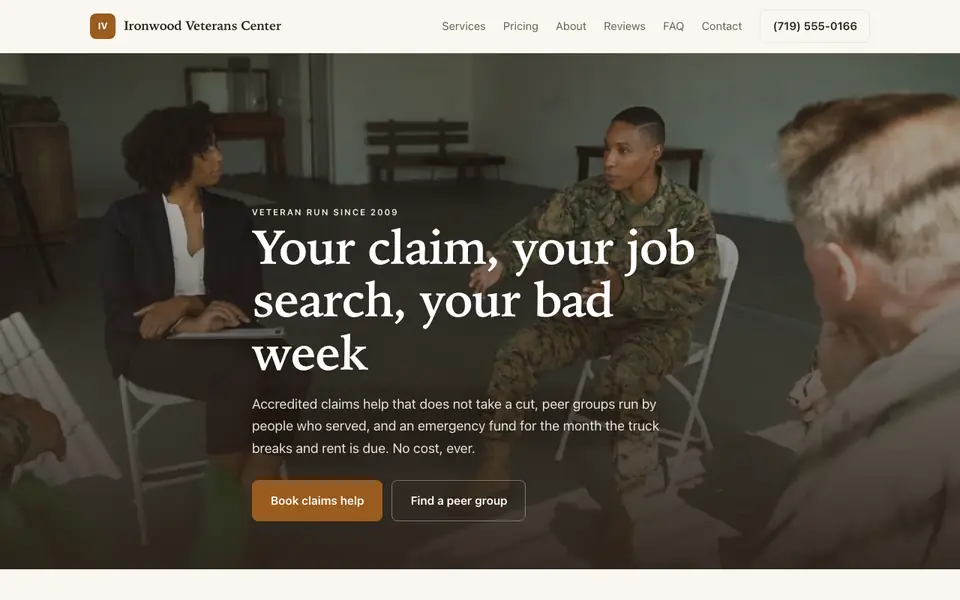
What a veteran finds on the Ironwood Veterans Center example
Ironwood Veterans Center is a nonprofit our AI described from one sentence; it does not exist. The example is laid out for a visitor who has one urgent need and little patience for a mission statement.
Services named by the problem they solve
Claims help, peer groups, job placement, emergency funds and housing are listed separately, each saying who qualifies. A veteran facing eviction needs to find housing help in seconds, not read every program.
Accredited claims help, and what it costs
Only VA-accredited representatives may help prepare and present benefit claims, and they may not charge for help with an initial claim. The example says its officers are accredited and free; if yours are, link each person's entry in the VA accreditation search.
Group meeting times on the page
Peer groups list their nights and who each group is for, such as women veterans or family members. Knowing the time and the room is often what gets someone through the door the first time.
Ironwood Veterans Center
This is Ironwood Veterans Center, a veterans org business we described to the AI in a sentence. See the Ironwood Veterans Center example site.
Start from this design
Three designs that suit a veterans org website.
- Community Mutual Aid Nonprofit
- Black Industrial Holding Company
Veterans Org website design without the agency retainer. Describe the business in plain English and the AI writes and builds the pages around it: your services, your prices, your words.
Perfect for:
- Veteran services
- Military families
- Veteran employment
Keep sensitive details off forms
Do not collect service records, discharge papers, disability ratings, medical or mental health information through website forms. Keep forms to name, contact details and general interest, and handle anything sensitive in person or through an appropriate secure process.
Point to official help
Benefits eligibility and claims should go through official government offices and accredited representatives. The resources page links to them, and your crisis support information should be prominent and accurate for your country.
Donations and charity rules
Donations can run through your own Stripe account. Check your nonprofit status, charitable solicitation registration and tax-receipt obligations where you operate before appealing for gifts online.
Use of emblems
If you are a chapter of a national organization, follow its rules on logos and naming. Avoid official military seals or insignia unless you have permission to use them.
What it costs
Building a site on We.Inc is free, with no card needed to start. Paid plans start at $20 a month, and a paid plan is needed to use your organization's own domain (about $10 to $20 a year to register).
Building your site is free, no card needed. Paid plans from $20 a month. Compare plans
Frequently asked questions
Can veterans apply for assistance through the site?
The site can have a general contact or interest form that emails your team. Do not use it to collect service records, medical details or financial documents; handle those securely and in person.
Can we accept donations?
Yes, through your organization's own Stripe account. Confirm your charitable registration and tax-receipt rules before running online appeals.
Can members pay dues online?
You can take dues payments through your own Stripe account. There is no member login or roster system, so keep membership records in your existing tools.
Can we post meeting and ceremony dates?
Yes. An events page can list meetings and ceremonies, and you can ask the AI to add or change dates in chat. There is no synced calendar feed.
Should we explain VA or government benefits ourselves?
Link to official sources and accredited representatives instead. Eligibility rules change, and outdated guidance can cost a veteran time or money.
Related industries and website guides
- nonprofit website design
- church website builder
- hoa website builder
- memorial website builder
- animal shelters website builder
- arts & culture nonprofits website builder
- Veterans organization website example
- how to make a website
Related website builders: Nonprofits & Community
- nonprofit website design
- church website builder
- hoa website builder
- memorial website builder
- animal shelters website builder
- arts & culture nonprofits website builder
Before you start
Free tools for local businesses
- Google review link generator
- WhatsApp link generator
- email signature generator
- schema markup generator
- image compressor
Product
Who It's For
- For Agencies
- For Freelancers
- For Hosting Providers
- For SaaS Platforms
- For Startups
- For Financial Services
- For Healthcare
Features
Resources
- Blog
- Help Center
- Free Business Tools
- Free UI Components
- Website Templates
- Template Collections
- Website Examples
- Guides
- Comparisons
- Alternatives
- Best Lists
- Reviews
- Pricing Guides
- Use Cases
- Glossary & Guides
- Integrations
- Developers
- Benchmark
- Windows App