
How to Start a Website Reseller Business in 2026
A website reseller sells sites, hosting and care under their own brand. Here is how to pick a niche, choose a platform, price plans and win 10 clients.
Start for free. No credit card required.
For agencies: White label website builder: your own branded AI builder (book a demo)
A website reseller sells finished websites to businesses under their own brand, then charges every month to host, maintain and improve them. To start one, pick a niche you can reach, choose a white-label website builder that lets you bill clients directly, package the build and the monthly care into two or three plans, and win your first 10 clients through outreach. Most of the income comes from the monthly plans, not the build.
Short answer: You do not need to code or hire developers. You need a niche, a platform whose pricing still works at 50 clients, simple packages priced around $99 to $349 a month, a written contract, and a steady outreach habit. The worked example below shows a realistic first year: 23 active clients and $3,827 in monthly recurring revenue by month 12.
What does a website reseller actually sell?
Clients do not buy "a website builder." They buy a site that looks professional, shows up in search and brings in calls. You package three things:
- The build. Pages, copy, images, forms and a launch on the client's domain. Usually a one-time setup fee.
- Hosting. The site stays online with SSL, covered by the monthly fee.
- Care. Edits, backups, monitoring and a monthly report. This is the part clients feel, and it justifies charging every month.
The build gets you in the door. The monthly plan is the business. Many small monthly clients also spread your risk. The Admin Bar's 2026 survey of 622 WordPress agency owners and freelancers found that agencies whose top 3 clients made up 75% or more of revenue reached $200k or more in revenue only 5.4% of the time, against 26.2% when the top 3 made up under 25%.
Web development reseller work is different: you sell custom development that a subcontractor does under your name. It works, but their rate sits inside every job. A website builder reseller owns a repeatable product, so each new client takes less time than the last.
Which niche should a website reseller pick?
A niche makes everything easier: templates repeat, your pitch sharpens, and referrals travel inside a trade. Good niches share four traits:
- The website makes them money. A plumber, dentist, physio clinic or wedding venue gets calls and bookings from it.
- They can afford $100 to $350 a month. A clinic can. A hobby club usually cannot.
- You can reach them. You know the trade, the area or a few owners already.
- Their sites look alike. Service pages, reviews, a quote form, a map. Similar structure means faster builds.
Commit to one niche for 6 months, then widen.
How to choose a white-label website builder reseller platform
If you resell a website builder, the platform is the product you put your name on, so judge it the way your clients will. A good reseller website builder passes this checklist:
- Branding depth. Your logo, name and colours on the login, dashboard, editor and emails, on your own domain. If the vendor's name shows anywhere, clients can find it and go direct.
- Billing. Can you charge clients through your own payment account, set your own prices and run subscriptions without a second invoicing tool?
- Pricing model. A flat monthly fee, a plan plus a fee per site, or a commission on plans. Work out the cost at 10, 25 and 50 clients.
- Client permissions. Decide what clients can edit alone. Too much access creates breakages. Too little creates tickets.
- Support. Who answers when a site is down at 9pm? Know whether the vendor supports you, your clients, or neither.
- Domains. Connecting a client's existing domain, automatic SSL, and DNS instructions you can reuse.
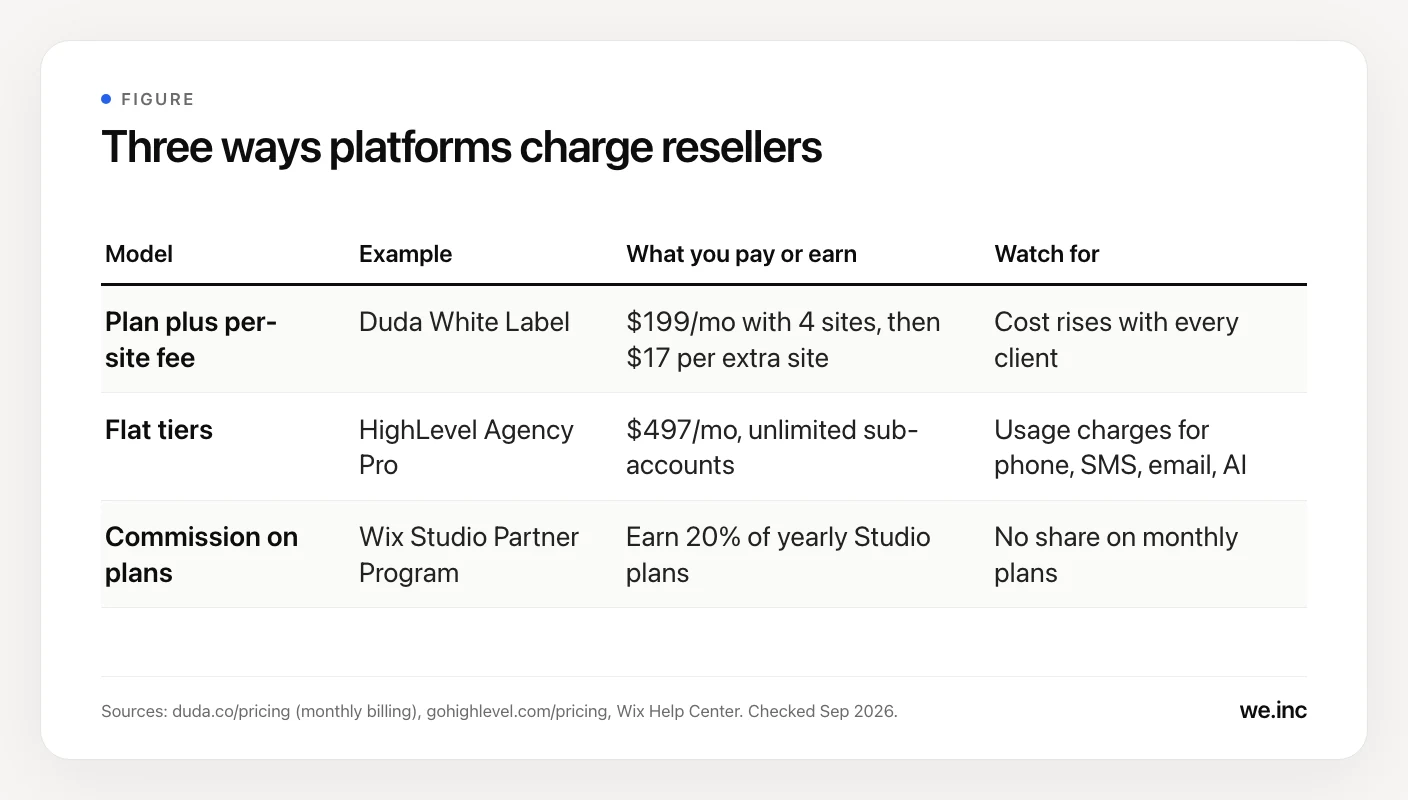
The pricing model matters most for reseller margins, because it decides whether your cost grows with every sale. Here is how three well-known platforms handle it, as of September 2026:
| Pricing model | Example | What you pay or earn | Watch for |
|---|---|---|---|
| Plan plus per-site fee | Duda White Label | $199/month billed monthly ($149/month billed annually), 4 sites included, then $17/month per extra site | Cost rises with every client |
| Flat tiers | HighLevel Agency Pro | $497/month with unlimited sub-accounts and SaaS Mode for selling your own plans | Usage charges for phone, SMS, email and AI |
| Commission on plans | Wix Studio Partner Program | You earn 20% of yearly Studio plans (30% at Legend level) | No share on monthly plans |
On Duda's White Label plan, 30 sites cost $199 + (26 × $17) = $641 a month on monthly billing. That is not a knock on Duda. It white-labels its builder, dashboard and platform emails on that plan, and its Client Billing tool bills clients through Stripe on the Team plan and above. HighLevel's flat tiers suit agencies that also sell CRM and automation. Wix Studio suits designers who want its editor and are happy earning a commission instead of marking up the platform.
Some white-label builders drop per-site fees entirely. We.Inc's white-label builder, for example, charges one flat monthly fee with no per-site charge, and partners bill their clients through their own Stripe account.
For a feature-by-feature walkthrough, read the complete white-label website builder guide, our Duda white-label review, or our comparison of HighLevel SaaS Mode and a white-label website builder.
How to price website reseller packages
Three packages work best: an easy yes, the one you want most clients on, and a premium option that makes the middle look reasonable. Stay inside what agencies already publish. Kyle Van Deusen of The Admin Bar reviewed more than 100 agency care plan pages in 2025 and found it was rare to see anything under $75, with most between $100 and $150 and a top end around $250, not counting plans that bundled the website or SEO. As of September 2026, WP Buffs lists $89 to $359 a month per site, and FatLab lists $99 to $599 a month with hosting and 0 to 8 developer hours included.
| Package | Monthly | Setup fee | What is included |
|---|---|---|---|
| Starter | $99 | $500 | Up to 5 pages, hosting and SSL, backups, monitoring, 30 minutes of edits a month |
| Growth | $199 | $1,000 | Up to 10 pages, quote or booking form, 1 hour of edits, monthly report |
| Premium | $349 | $2,000 | Up to 20 pages, local SEO basics, 3 hours of edits, quarterly review call |
A few rules keep these profitable:
- Cap the edit time. "Unlimited edits" invites redesigns. Even WP Buffs, which advertises unlimited edits, excludes custom development, content creation and graphic design.
- Charge a setup fee. It pays for onboarding and filters out clients likely to cancel in month two.
- Set a minimum term of 6 or 12 months, or charge a higher setup fee without one.
- Raise prices yearly. Say so in the contract from day one.
Your margin per client is the price minus platform cost, tools and time, and it swings with the pricing model above. Run your numbers in the reseller margin calculator.
What legal basics does a website reseller need?
This is general information, not legal advice. Talk to a local lawyer and accountant before you sign your first client.
- Set up the business. Register it, open a separate bank account, and ask an accountant whether website subscriptions are taxable where you and your clients are.
- Use a written contract. Cover scope, monthly term and notice period, what counts as an edit, response times, payment dates, what happens when a card fails, and what the client keeps if they leave (their domain, content, logo and photos).
- Publish your own terms and privacy policy, since clients will log in to software under your name.
- Price professional liability insurance before you need it.
- Keep the domain in the client's name. ICANN's registrant rules say the registrant will "assume sole responsibility for the registration and use" of the domain, must keep contact details accurate, and must answer their registrar within 15 days. Register the domain with the client as the registrant and ask for delegated or DNS access for yourself. That prevents disputes if you part ways.
How to get your first 10 clients
Going looking beats waiting. In The Admin Bar's 2026 survey, agencies that pursued new business through channels like SEO, partnerships or community passed $200k in revenue 24.8% of the time, against 11.6% for agencies relying on word of mouth. They were also consistently profitable 53.8% of the time, against 33.1%.
A practical path to 10:
- Tell your network (clients 1 to 3). Offer five founding spots at a lower setup fee in exchange for a review and a referral.
- Build before you pitch (clients 4 to 6). List 20 businesses in your niche with a dated or missing website. Draft a homepage for the best 5 and send each a short video walkthrough. With an AI builder, a draft takes minutes, not days.
- Partner with people who already have your clients (clients 7 to 10). Accountants, bookkeepers, business coaches and trade associations. Offer a referral credit per signed client.
- Ask every client for one introduction once the site is live and the first leads arrive.
Track four numbers: messages sent, replies, calls booked and clients won. After 50 to 100 conversations you will know your close rate.
Worked example: a reseller's first year, month by month
Here is a realistic first year for a solo reseller using the three packages above. New clients pay their setup fee and first month in the month they sign. Two Starter clients cancel during the year.
| Month | New clients | Cancelled | Active clients | Monthly recurring revenue | Setup fees |
|---|---|---|---|---|---|
| 1 | 1 Starter | 0 | 1 | $99 | $500 |
| 2 | 1 Growth | 0 | 2 | $298 | $1,000 |
| 3 | 2 Starter | 0 | 4 | $496 | $1,000 |
| 4 | 1 Starter, 1 Growth | 0 | 6 | $794 | $1,500 |
| 5 | 1 Starter, 1 Growth | 0 | 8 | $1,092 | $1,500 |
| 6 | 1 Starter, 1 Premium | 0 | 10 | $1,540 | $2,500 |
| 7 | 1 Starter, 1 Growth | 1 Starter | 11 | $1,739 | $1,500 |
| 8 | 2 Starter, 1 Growth | 0 | 14 | $2,136 | $2,000 |
| 9 | 1 Starter, 1 Premium | 0 | 16 | $2,584 | $2,500 |
| 10 | 1 Starter, 2 Growth | 1 Starter | 18 | $2,982 | $2,500 |
| 11 | 1 Starter, 1 Growth | 0 | 20 | $3,280 | $1,500 |
| 12 | 2 Starter, 1 Premium | 0 | 23 | $3,827 | $3,000 |
Check month 12: 12 Starter × $99 = $1,188, 8 Growth × $199 = $1,592, 3 Premium × $349 = $1,047. Total: $3,827.
Year-one totals:
- Recurring revenue collected: $20,867, the sum of the monthly column.
- Setup fees: $21,000 (14 Starter × $500, 8 Growth × $1,000, 3 Premium × $2,000).
- Total year-one revenue: $41,867.
- Year two, with no new sales and no cancellations: the 23 clients alone bring $3,827 × 12 = $45,924.
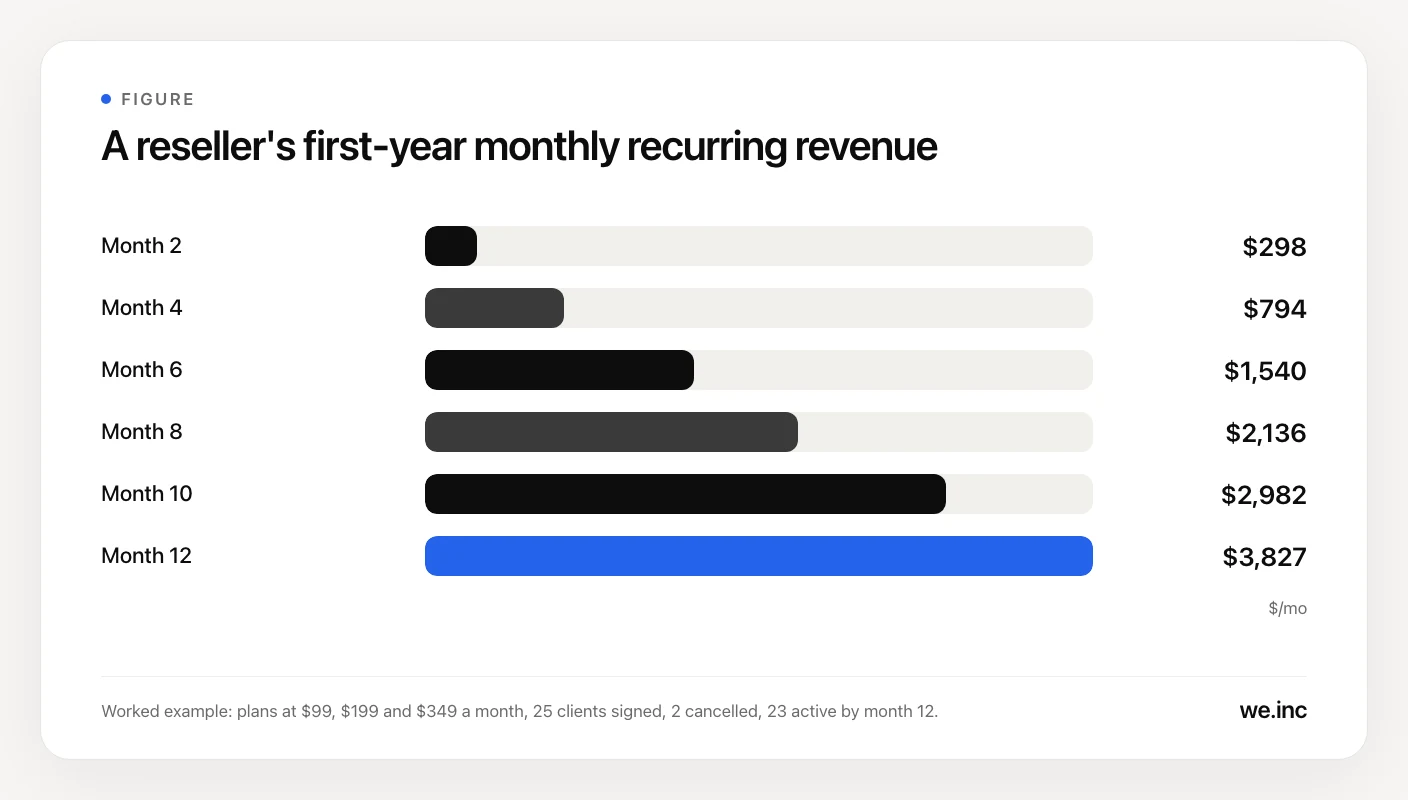
This is revenue, not profit: subtract platform, tools and hours. Setup fees made up half of year one, but by month 12 the monthly plans alone run at $45,924 a year, more than double the year's setup fees. Keeping clients is the whole game, which is why website care plans that turn builds into monthly revenue deserve their own guide.
How do you deliver client sites without drowning?
Around client 15, delivery gets hard unless the process is written down.
- Onboarding form. Collect logo, colours, services, photos, reviews, hours and domain access before work starts.
- A 10-day build schedule. Day 1 kickoff, day 3 first draft, day 6 revisions, day 9 domain and form tests, day 10 launch.
- Launch checklist. Domain connected, SSL active, forms reaching the right inbox, analytics working, mobile layout checked.
- One edit queue. Changes come through one form or inbox, never text messages. Log minutes against each plan.
- Monthly report. Five lines: uptime, edits done, form leads, top pages and one suggestion.
- Automated billing. Subscriptions charge automatically, with failed-payment emails and retries turned on.
Where We.Inc fits
If you want to resell an AI website builder under your own brand, We.Inc's white-label platform is built for it. Partners run the builder on their own web address with their own name, logo and colours on the login, dashboard and builder screens, and emails to their customers carry the partner's brand. Customers pay you through your own Stripe account. You or your client describe the business, the AI builds the site, and you refine it visually or in code before publishing to a custom domain with SSL. There is a 0% transaction fee. Pricing is tailored to your volume and setup. Book a 30-minute demo and you get your exact price on the call: Book a demo.
Sources
- Duda pricing, checked September 2026
- Duda Client Billing, checked September 2026
- HighLevel pricing, checked September 2026
- Wix Help Center: partner earnings, checked September 2026
- The Admin Bar: State of the WordPress Agency 2026, checked September 2026
- The Admin Bar: What is a Website Care Plan and What's Included?, checked September 2026
- WP Buffs care plans, checked September 2026
- FatLab Web Support pricing, checked September 2026
- ICANN: Registrants' Benefits and Responsibilities, checked September 2026
Frequently asked questions
How much does it cost to start a website reseller business?
The main costs are a white-label platform subscription, a website for your own brand, a contract reviewed by a lawyer, business registration and insurance. Platform pricing varies the most. Some platforms charge a flat monthly fee, others charge a plan plus a fee for every published site, so model your cost at 10, 25 and 50 clients before you sign. You do not need developers or servers to start.
How much money can you make reselling websites?
It depends on your packages and how many clients stay. In a worked example with plans at $99, $199 and $349 a month, a solo reseller who signs about two clients a month ends year one with 23 active clients and $3,827 in monthly recurring revenue, plus $21,000 in setup fees collected during the year. That is revenue before platform costs, tools and your time.
Do I need to know how to code to resell websites?
No. A white-label website builder handles hosting, the editor and publishing, and AI builders can draft a site from a short business description. The skills that matter more are sales, clear writing, basic design judgment, and handling domains and DNS settings. Coding helps with custom features, but most small business sites for trades, clinics and local services never need it.
Who should own the domain name when I resell a website?
The client should. Register the domain with the client as the registrant and ask for delegated or DNS access for yourself. Under ICANN's rules, the registrant takes sole responsibility for the registration and use of the domain and must keep contact details accurate. Keeping it in the client's name avoids disputes if you part ways and makes clients more comfortable signing a monthly plan.
What is the difference between a website builder reseller and a web development reseller?
A website builder reseller sells sites built on a white-label platform under their own brand, so the product and the delivery process repeat for every client. A web development reseller sells custom development that a subcontractor does under the reseller's name. The second model handles unusual projects well, but every job carries the subcontractor's rate, which caps your margin as you grow.
More in Blog
- How to Start Your Own Website Builder Business (AI Builds Each Site in 20 Seconds)
- Startup Launch Checklist for 2026
- How to Start a Subscription Box Business: Step by Step
- Swiftlet Runs an 80B LLM in 4.3 GB of RAM on a Mac. Here Is How to Build on It.
- Tattoo Website Design: Free Template and Examples
- Tech Stack Consolidation: A Practical Strategy Guide
- How to Run a Telegram Marketing Campaign
- Therapist Website Builders: A Fair Comparison and Design Guide
Alternatives mentioned in this article
Related guides and tools
Start building
- how to make a website
- AI website builder
- free website builder
- website templates
- website builders by industry
How we research, test and update this page: our editorial policy. We.Inc is our own product.
Product
Who It's For
- For Agencies
- For Freelancers
- For Hosting Providers
- For SaaS Platforms
- For Startups
- For Financial Services
- For Healthcare
Features
Resources
- Blog
- Help Center
- Free Business Tools
- Free UI Components
- Website Templates
- Template Collections
- Website Examples
- Guides
- Comparisons
- Alternatives
- Best Lists
- Reviews
- Pricing Guides
- Use Cases
- Glossary & Guides
- Integrations
- Developers
- Benchmark
- Windows App