
How to Start Your Own Website Builder Business (AI Builds Each Site in 20 Seconds)
You do not need to build a website builder to sell one. Get a branded AI builder, invite a client, then add your domain and Stripe.
Start for free. No credit card required.
Related: How the We.Inc AI website builder works, with real sites it built
For agencies: White label website builder: your own branded AI builder (book a demo)
To start your own website builder business, you do not build a website builder. You launch an existing one under your brand (white label), give it to a niche you can reach, and charge those clients every month. On We.Inc you book a demo, get your branded portal, and invite your first client.
Short answer:
- Pick the customers you will sell to (one trade, one region, or your existing clients).
- Get a branded AI website builder: Book a demo of We.Inc's white-label builder.
- Invite one real client and have them build a site with you watching.
- When it works, add your own domain (app.yourbrand.com for the portal, sites.yourbrand.com for client sites) and connect your Stripe.
- Price two or three plans and sell the monthly plan, not the build.
The rest of this guide covers each step, the three ways to own a website builder, and a worked example of the numbers.
What does "your own website builder" actually mean?
Your clients sign in at a page with your logo, build their sites inside a dashboard with your colours, get emails with your name, and pay you. Behind it, a platform company runs the software, hosting and AI. This is called a white-label website builder.
It is a different business from a web design agency. An agency sells hours: you build every site. A website builder business sells a product: clients describe the site they want, the AI builds it, and you sell support, setup and a monthly plan around it. The work per client drops, so one person can serve far more clients.
Build, license, or white label: the three ways to own one
| Route | What you get | Time to first client | Best for |
|---|---|---|---|
| Build it yourself | Full control of every line of code | Months to years | Funded software companies whose builder is the product |
| License an API or embed | Site building inside your existing app | Weeks, plus developer time | SaaS platforms with an engineering team |
| Self-serve white label | A finished, branded builder and client portal | Minutes | Agencies, freelancers, MSPs, hosting companies |
Building it yourself means writing and maintaining an editor, hosting, SSL certificates, custom domain routing, backups, billing and, now, AI site generation. Each of those keeps costing money after launch. If you want to embed site building inside your own software, read white label vs API website builder and how to add a website builder to your SaaS.
For everyone else, white label is the fast route. Until recently it usually meant a sales call and a setup project. It no longer has to.
Step 1: Pick who you will sell to
A niche makes the product easier to sell. Your sign-in page, templates and pitch can all speak to one kind of customer. Good first groups:
- Your existing clients. If you already run IT, hosting, marketing or bookkeeping for 20 businesses, they are your first 20 prospects.
- One trade. Plumbers, clinics, salons, restaurants. Their sites share a structure: services, reviews, a booking or quote form, a map.
- One region or language. The We.Inc portal runs in English, Spanish, French, German and Portuguese, so you can serve a market in its own language.
Each audience has its own playbook on our site: for MSPs and agencies, for freelancers, for hosting providers and for SaaS platforms.
Step 2: Launch your branded builder
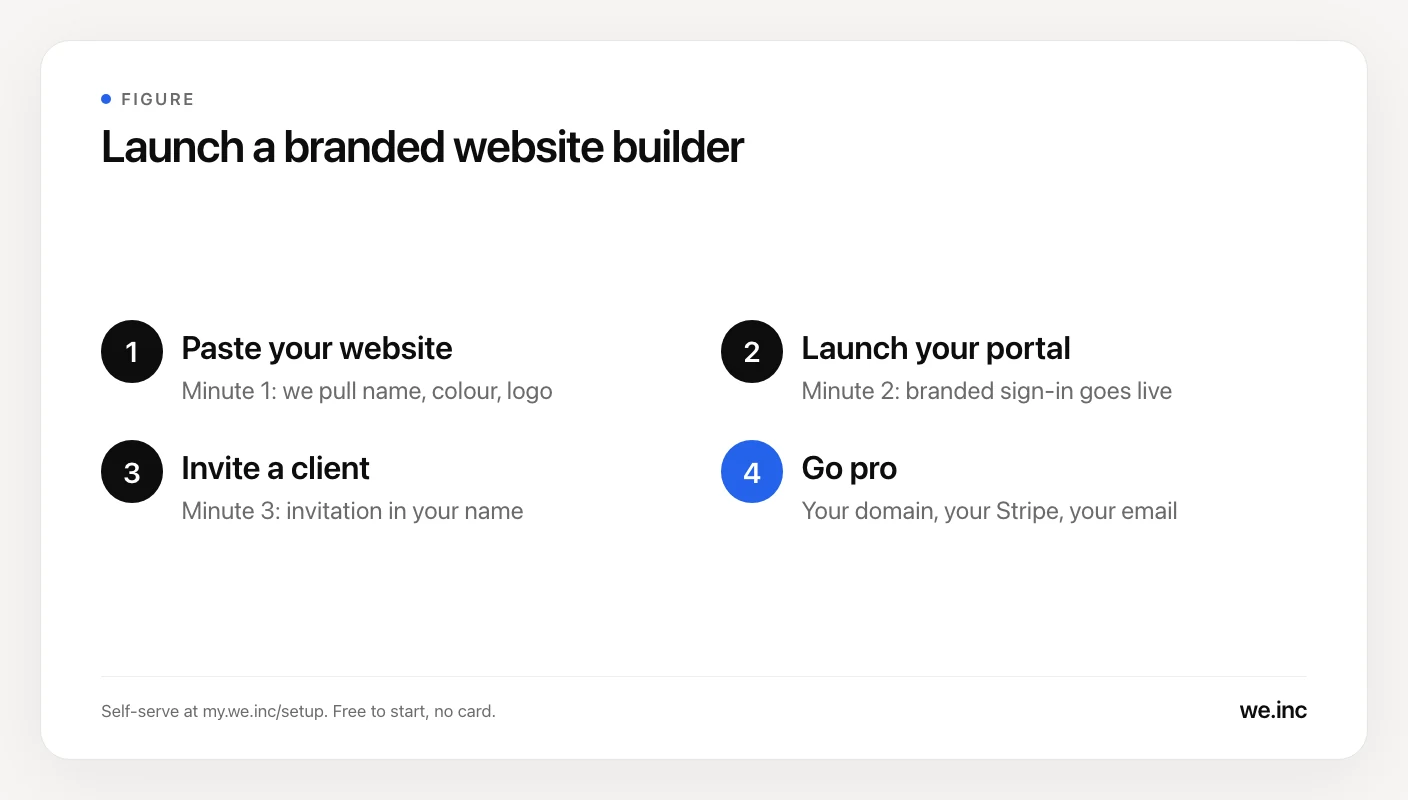
Here is the flow on We.Inc:
- Book a demo. Book a demo and we walk through your setup: your business name, colour and logo.
- Get your portal. Your branded sign-in page and client dashboard.
- Invite your first client. They get an invitation in your name and sign in on your portal.
That is the whole launch. Pricing is tailored to your volume and setup. Book a 30-minute demo and you get your exact price on the call.
Step 3: Run one real client through it
Before you sell to 50 businesses, watch one use it. Sit with a friendly client for 30 minutes:
- They sign in on your portal and describe their business in plain words.
- The AI builds the site. They edit text and photos visually.
- You note every question they ask. Those questions become your onboarding email and your help page.
This one session tells you what to charge for. Some clients are happy to build alone. Others want you to do the first version. Both are sellable.
Step 4: Go pro when it works
These are the steps that turn a first client into a business. Pricing is tailored to your volume and setup. Book a 30-minute demo and you get your exact price on the call.
- Your own domain. Type your domain in setup. We copy your existing DNS records so your current site and email keep working, then you change two nameservers at your registrar. Within about an hour the portal answers at app.yourbrand.com and client sites at sites.yourbrand.com.
- Your own Stripe. Clients pay you directly, in your own currency. The money lands in your Stripe account. There is a 0% transaction fee.
- Email from your own domain. Platform emails can come from your address; confirm the details for your setup on the demo.
If you ever leave, cancel from your account with no notice period and no exit fee. Your clients pay you through your own Stripe, so the relationship was always yours.
Step 5: Price plans your clients understand
Clients do not buy "a website builder." They buy a site that brings in calls. Package it in two or three plans:
| Plan | What the client gets | Who it suits |
|---|---|---|
| Do it yourself | Their own login on your portal, AI builds the site, they edit it | Owners who like to tinker |
| Done with you | You build the first version, they make small edits | Most small businesses |
| Done for you | You handle every change, plus a monthly check-in | Clinics, firms, busy owners |
Your prices are yours to set. Our website care plans guide and website reseller guide cover price ranges agencies charge today.
Worked example: the first year
Take a freelancer with 12 existing clients and a local trade niche. These are client prices the freelancer sets, not platform prices:
- Month 1: launches the portal, moves 3 existing clients onto the "done with you" plan at $79 a month.
- Months 2 to 12: adds 2 clients a month from the trade niche, 22 in total.
- By month 12, 3 of those niche clients have cancelled.
Revenue at month 12, with 19 niche clients split 10 on "do it yourself" at $29 and 9 on "done with you" at $79, plus the 3 early clients at $79:
- 10 × $29 = $290
- 12 × $79 = $948
- Total: $1,238 in monthly recurring revenue from 22 active clients
Subtract your platform cost (from your quote), your domain and your time. The point is the shape: every client added keeps paying, and the work per client is a fraction of a custom build. If you want a heavier "done for you" mix, the reseller guide has a worked example that reaches $3,827 a month.
Questions to ask any white-label platform before you commit
Whichever platform you choose, get clear answers to these:
- Can I start without a sales call? If the first step is a demo, your launch date depends on their calendar.
- Does the platform take a cut of what my clients pay? Some do. We.Inc charges a 0% transaction fee.
- Is there a per-site fee? Costs that grow with every client squeeze your cheapest plans. See our Duda white label review for how per-site pricing adds up.
- What do clients see? Login page, dashboard, emails, and any "powered by" line, plan by plan.
- How is AI usage allocated per client on each plan? Every AI builder meters this somehow. Know it before you price your plans.
- What happens if I leave? Look for no exit fee and clients who stay with you.
For a full vendor comparison, see the best white label website builders in 2026 and the complete white-label guide.
Start yours today
The fastest way to learn if this business fits you is to launch it and invite one client. Book a demo of the white-label builder and get your exact price on the call. Over 50,000 websites have been built on the platform you will be reselling.
Want to see the full offer first? Read the We.Inc white-label page or check pricing.
Frequently asked questions
Can I start my own website builder without coding?
Yes. A white-label website builder gives you a finished platform under your own name, logo and colours, so you skip building the editor, hosting and publishing yourself. On We.Inc you get a branded client portal and invite your first client, with no code. Book a demo at https://calendly.com/hey-we/30min to get started.
How long does it take to launch a branded website builder?
With a white-label platform, far less time than building one. On We.Inc you start with a 30-minute demo (https://calendly.com/hey-we/30min); your portal carries your name, colour and logo, and you invite a client. Connecting your own domain is a separate step, and the portal usually answers on it within an hour of changing two nameservers.
What does it cost to start a website builder business?
On We.Inc, white-label pricing is tailored to your volume and setup. Book a 30-minute demo at https://calendly.com/hey-we/30min and you get your exact price on the call. Budget separately for a domain, a simple contract and your own marketing.
Do I have to build my own website builder software?
Only if the builder itself is your product and you have an engineering team. Writing an editor, hosting, SSL, domain handling, billing and AI generation from scratch is a long project that keeps costing money after launch. Most agencies, freelancers and hosting companies license a white-label platform and put their effort into clients and niche.
How do I get paid by clients on my own website builder?
Connect your own Stripe account. On We.Inc, clients pay you directly in your currency, the money lands in your Stripe balance, and there is a 0% transaction fee. You set your own prices for your clients.
Can my clients see that the builder is not mine?
On We.Inc, everything clients see carries your name, logo and colours. Ask on the demo (https://calendly.com/hey-we/30min) exactly what your setup shows, including email from your own domain.
More in Blog
- Startup Launch Checklist for 2026
- How to Start a Subscription Box Business: Step by Step
- Swiftlet Runs an 80B LLM in 4.3 GB of RAM on a Mac. Here Is How to Build on It.
- Tattoo Website Design: Free Template and Examples
- Tech Stack Consolidation: A Practical Strategy Guide
- How to Run a Telegram Marketing Campaign
- Therapist Website Builders: A Fair Comparison and Design Guide
- Tree Service Website Design: Pages, Costs and a Template
Website builders for the businesses in this article
Related guides and tools
Start building
How we research, test and update this page: our editorial policy. We.Inc is our own product.
Product
Who It's For
- For Agencies
- For Freelancers
- For Hosting Providers
- For SaaS Platforms
- For Startups
- For Financial Services
- For Healthcare
Features
Resources
- Blog
- Help Center
- Free Business Tools
- Free UI Components
- Website Templates
- Template Collections
- Website Examples
- Guides
- Comparisons
- Alternatives
- Best Lists
- Reviews
- Pricing Guides
- Use Cases
- Glossary & Guides
- Integrations
- Developers
- Benchmark
- Windows App