Showing clients their numbers without exporting a single spreadsheet
The question every site owner eventually asks is "is anyone actually visiting?" If the honest answer lives in a tool only you can log into, you end up screenshotting charts into emails every month. This page shows where visitor numbers appear in We.Inc for you, your team and your clients, what each view counts, and what it does not.
TL;DR
- There are four places numbers show up: your brand Insights, the agency Analytics overview, the client's own Analytics panel, and an optional monthly email to each client.
- Insights covers clients, active clients, sites created and published, visitors, top sites and revenue from clients, over 7, 30 or 90 days.
- The monthly report goes out on the 1st, from your brand, with last month's visitors, most visited pages and the change on the month before. It is off until you switch it on.
- Visitor tracking is built into the sites; no separate analytics account is needed to see the basics.
Why reporting is the part clients remember
Clients rarely judge a website on the day it launches. They judge it three months later, when they wonder whether it was worth paying for. If the only person who can see the traffic is you, every one of those moments turns into a support request, and a quiet month turns into a cancellation you did not see coming.
Good client reporting does three jobs:
- It answers "is it working?" before the client asks. A short monthly note with real numbers does more for renewals than any feature list.
- It warns you early. A site with no visits for a week is either broken, unpublished or forgotten. You want to know before the client does.
- It stays in your name. A report that arrives from a third-party analytics product teaches your client which vendor really runs their site.
We.Inc handles these with views you already have under your brand, rather than a separate analytics product to configure for each client.
1. Your brand's Insights: the whole book at a glance
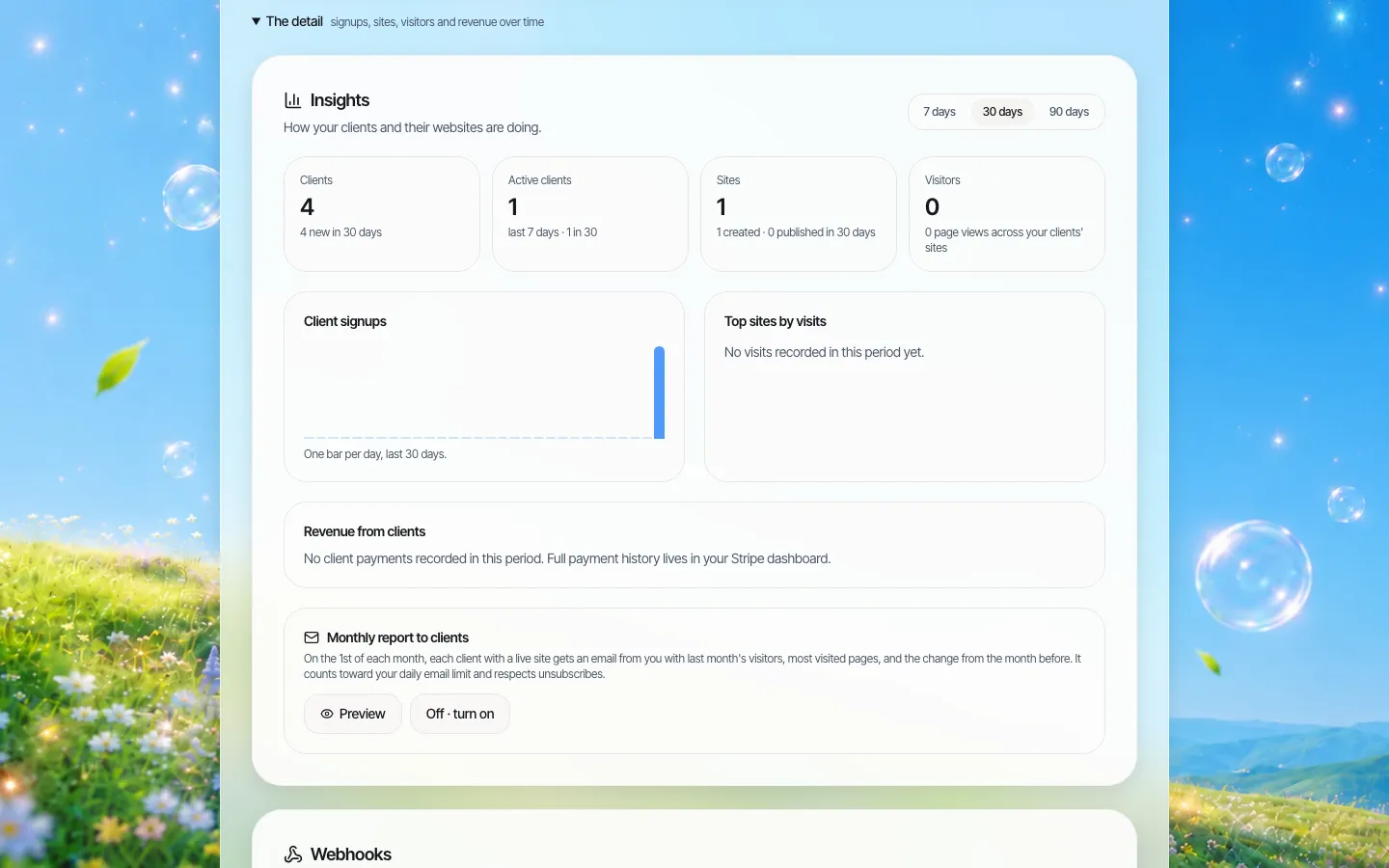
*Insights on a demo brand over 30 days: four clients, one active in the last week, one site created, and the switch for the monthly client report at the bottom.*
Insights is the owner's summary, visible to the brand owner and admins. Pick a window of 7, 30 or 90 days and it shows:
| Card | What it counts |
|---|---|
| Clients | Every client under your brand, plus how many joined in the window |
| Active clients | Clients active in the last 7 days and the last 30 |
| Sites | Sites created and sites published, in total and in the window |
| Visitors | Page views and visitors across all your clients' sites |
| Client signups | One bar per day, so you can see which week your campaign landed |
| Top sites by visits | Your busiest client sites, with views and visitors |
| Revenue from clients | Payments clients made to you in the window, by currency, with the number of paying clients |
Revenue here is a summary. The full payment history stays in your own Stripe account, which is where your accountant will want it anyway.
2. The agency Analytics overview: which sites need attention
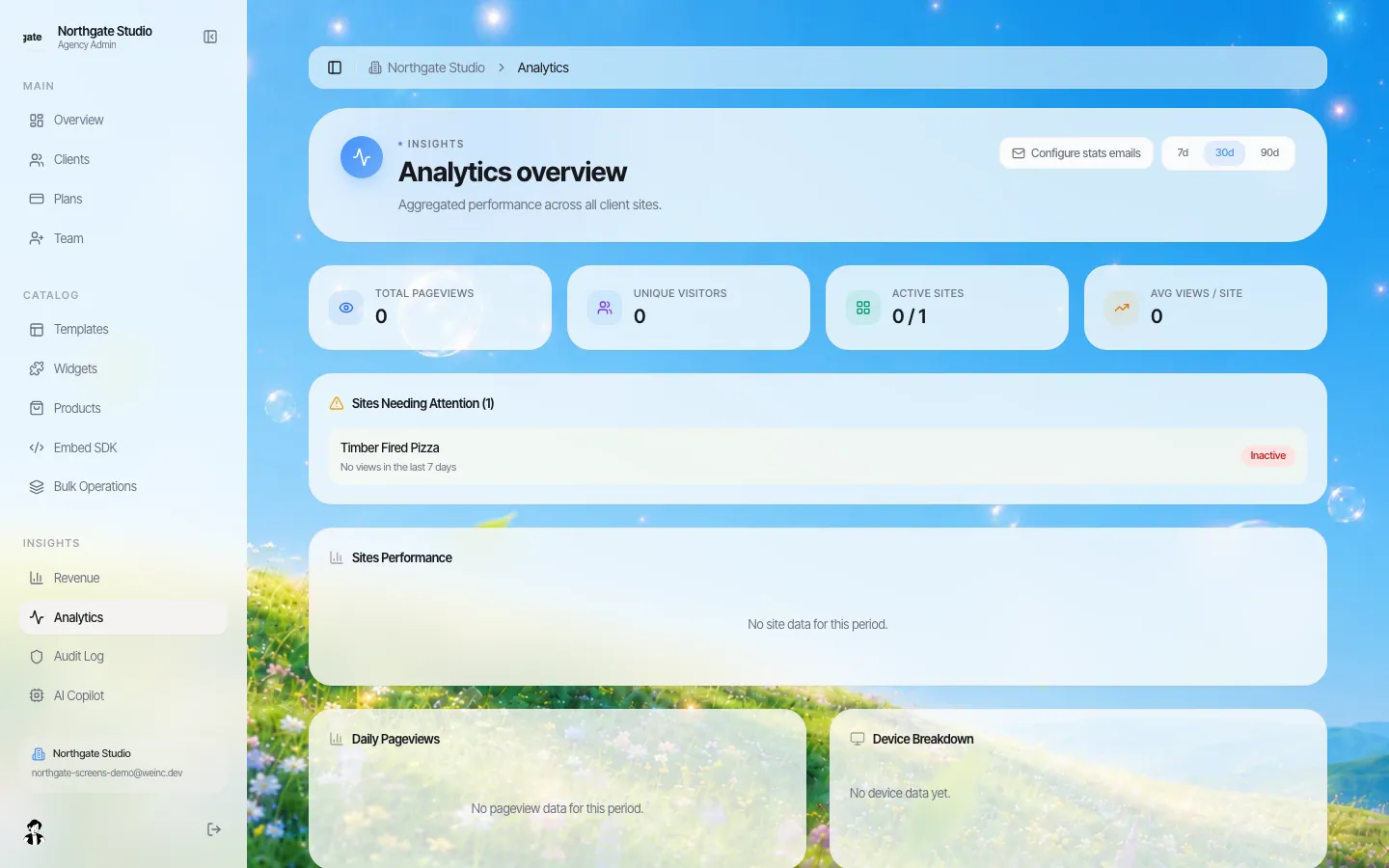
*The agency console's Analytics overview. The demo site is flagged in "Sites Needing Attention" because it had no views in the last 7 days.*
The second view is built for the person who looks after sites day to day. Beyond the totals (page views, unique visitors, active sites, average views per site), the useful part is Sites Needing Attention: a list of client sites with no views in the last week.
Treat that list as a weekly work queue. A site lands on it for one of a handful of reasons, and each has a different fix:
| Likely cause | How to check | What to do |
|---|---|---|
| The site was never published | The client's site shows as not published | Nudge the client, or publish it for them if your process allows |
| Its domain stopped pointing at the site | Open the live address | Ask the client to check the domain settings at their registrar |
| It is a new site with no promotion yet | Created recently, published, no links | Send the client a short launch checklist |
| The business closed or moved on | No logins either | Talk to the client before the renewal does it for you |
From the same screen, Configure stats emails turns on a regular summary email, weekly or monthly, with per-client preferences.
3. The client's own Analytics panel
Clients do not have to ask you for their numbers. Inside their editor, the panels menu includes Analytics, alongside Blog, SEO, Store, Domain and the others.
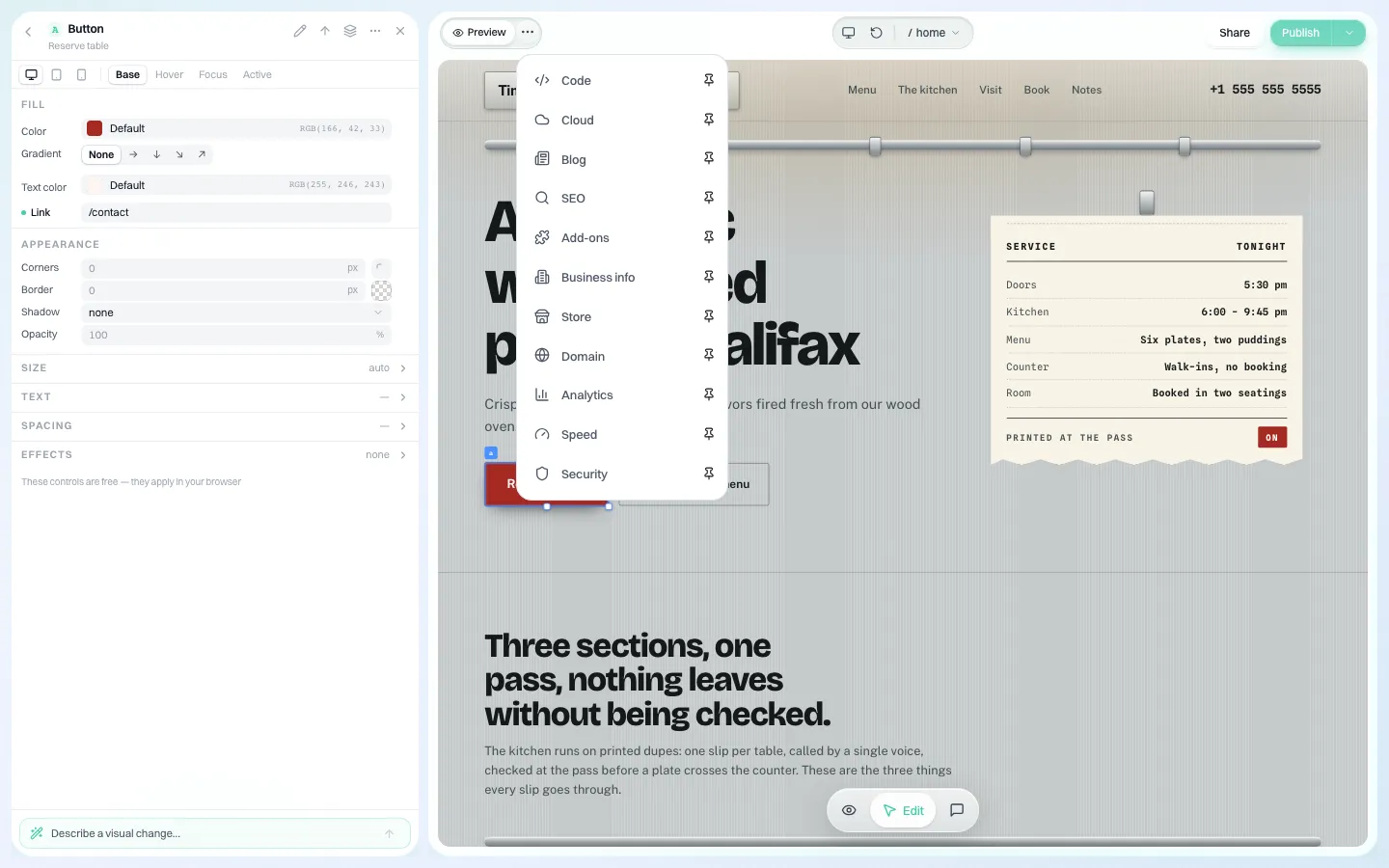
*The panels menu inside a client's editor. Analytics sits next to the other site tools, under your brand.*
The panel shows visitors and page views over the last 24 hours, 7, 30 or 90 days, a chart of page views over time, the top page, and tables for traffic sources and devices. It is deliberately plain: enough for a café owner to see that last Saturday's post brought people in, without learning a reporting tool.
4. The monthly report, sent in your name
The feature most agencies end up valuing most is the one that needs no logins at all. When you switch on Monthly report to clients, on the 1st of each month every client with a live site receives an email from your brand with:
- last month's visitors,
- the most visited pages,
- the change against the month before.
A few details that matter in practice:
- It is off until you turn it on. You can preview it first.
- One report per client per month. The send is recorded before it goes out, so a repeated run cannot send it twice.
- It respects unsubscribes and counts toward your brand's daily email limit, shared with your automatic emails.
- It goes out in your brand's email layout and from your sender. Nothing in it names or links to We.Inc. If you have verified your own sending domain, it comes from that address. See branded client emails.
A reporting rhythm you can copy
Numbers only help if someone looks at them on a schedule. A simple rhythm for a team running dozens of client sites:
| When | Who | What |
|---|---|---|
| Every Monday | Whoever handles support | Work through Sites Needing Attention; note the cause in each client's notes |
| 1st of the month | Automatic | Monthly report goes to every client with a live site |
| 2nd to 5th of the month | Account owner | Reply personally to the three clients whose traffic fell most; offer one concrete fix |
| Quarterly | Brand owner | Insights over 90 days: signups, published sites, revenue. Decide where to spend effort next quarter |
The personal reply is the part that keeps clients. The report tells them what happened; you tell them what to do about it.
What this does not do
Being clear about limits saves an awkward conversation later:
- It is not a full analytics suite. There are no conversion funnels, goal tracking or custom events in these views. If a client needs that, they can add their own tracking tool to their site.
- The monthly report is fixed in content. It covers visitors, top pages and the month-on-month change; you choose whether it is sent, not what columns it has.
- No per-client report designer. Every client gets the same report format in your brand layout.
- Numbers are only as good as the period. A brand-new site will show zeros for a while, as the demo screenshots above do.
Questions to bring to the demo
- How many client sites do you report on today, and how long does it take each month?
- Do clients want numbers, or do they want reassurance? (The monthly email covers the first; your reply covers the second.)
- Which clients would need more than visitors and pages, and do they already have their own tracking?
Book a demo and we will walk through Insights, the attention list and a preview of the monthly report on a sample brand.
Book a demo. Pricing is tailored to your volume and setup, and you get your exact price on the call. 0% transaction fee.
Frequently asked questions
Can my clients see their own website traffic?
Yes. Each client has an Analytics panel inside their editor with visitors, page views, top page, sources and devices over 24 hours, 7, 30 or 90 days.
What is in the monthly client report?
Last month's visitors, the most visited pages and the change against the month before. It is sent on the 1st to every client with a live site, from your brand, once you switch it on.
Does the report mention We.Inc?
No. It uses your brand's email layout and sender, and nothing in it names or links to We.Inc.
Do I need Google Analytics for this?
No. Visitor counts for these views are collected by the platform. A client can still add their own analytics tool if they want deeper reports.
Keep reading
- White label website builder: the We.Inc platform
- Branded emails to your clients
- Manage many client websites from one account
- White-label client dashboard
- Website maintenance packages
- White-label custom branding
More in White Label
- Client Dashboard | White Label
- Answer the same ten client questions once, in your own words
- The first email a client gets from your platform should look like it came from you
- The first week decides whether a client builds or churns
- Decide what every site owner can do, in seven switches
- Your logo on someone else's product is not a portal. Your words and your menu are
- Your best work, as a starting point for every new client
- Stop being your clients' content-entry service
We.Inc is an AI-powered website builder you can resell under your own brand. Launch a branded client dashboard, bill on Stripe Connect, and deliver AI-generated websites in minutes. White-label pricing is tailored to your volume and setup: book a 30-minute demo for a quote.
Product
- AI Website Builder: Describe a site in plain English; it's live in minutes
- White Label Platform: Your brand, your domain, your margin
- Enterprise: SSO, custom SLAs, and dedicated support
- Developer API: Embed site generation into your SaaS
Who It's For
- For Agencies: Resell under your brand
- For Freelancers: Your own branded builder
- For Hosting Providers: Add a builder to your stack
- For SaaS Platforms: Embed site creation via API
- For Startups
- For Financial Services
- For Healthcare
Features
- Drag & Drop Editor
- Built-in SEO Tools
- Custom Branding
- Client Dashboard
- Reseller Billing (Stripe Connect)
Resources
- Blog
- Help Center
- Free Business Tools
- Free UI Components
- Website Templates
- Template Collections
- Website Examples
- Guides
- Comparisons
- Alternatives
- Best Lists
- Reviews
- Pricing Guides
- Use Cases
- Glossary & Guides
- Integrations
- Developers
- Benchmark
- Windows App