Single sign-on for your client portal: corporate identity or one-click links
Passwords are where white-label portals leak support time. Clients forget them, staff share them, and nobody turns them off when someone leaves. Single sign-on fixes that in two different ways, depending on whether your users already live in a corporate directory or in your own software.
TL;DR
- SAML or OIDC: connect an identity provider so your team and clients sign in with their corporate account.
- Login links: your own system asks the API for a one-time link that signs a client straight into the portal.
- Links are signed, single use and expire; each one is recorded in the audit log.
- Single sign-on is a plan feature; confirm it for your setup on the demo.
Two problems, two tools
| Situation | Tool | What the user does |
|---|---|---|
| Your organisation or your client uses a corporate directory | SAML or OIDC | Signs in with their work account |
| Your clients already sign in to your own app or member area | Login links through the API | Clicks "Edit my website" in your app and lands in the editor |
| Small clients with no directory and no app of yours | Neither | Email invitation and normal sign-in |
Corporate sign-in with SAML or OIDC
In the brand console, the SSO page shows the service provider metadata to give your identity provider administrator, as a URL or an XML download. You then add the provider. Both SAML and OIDC providers are supported.
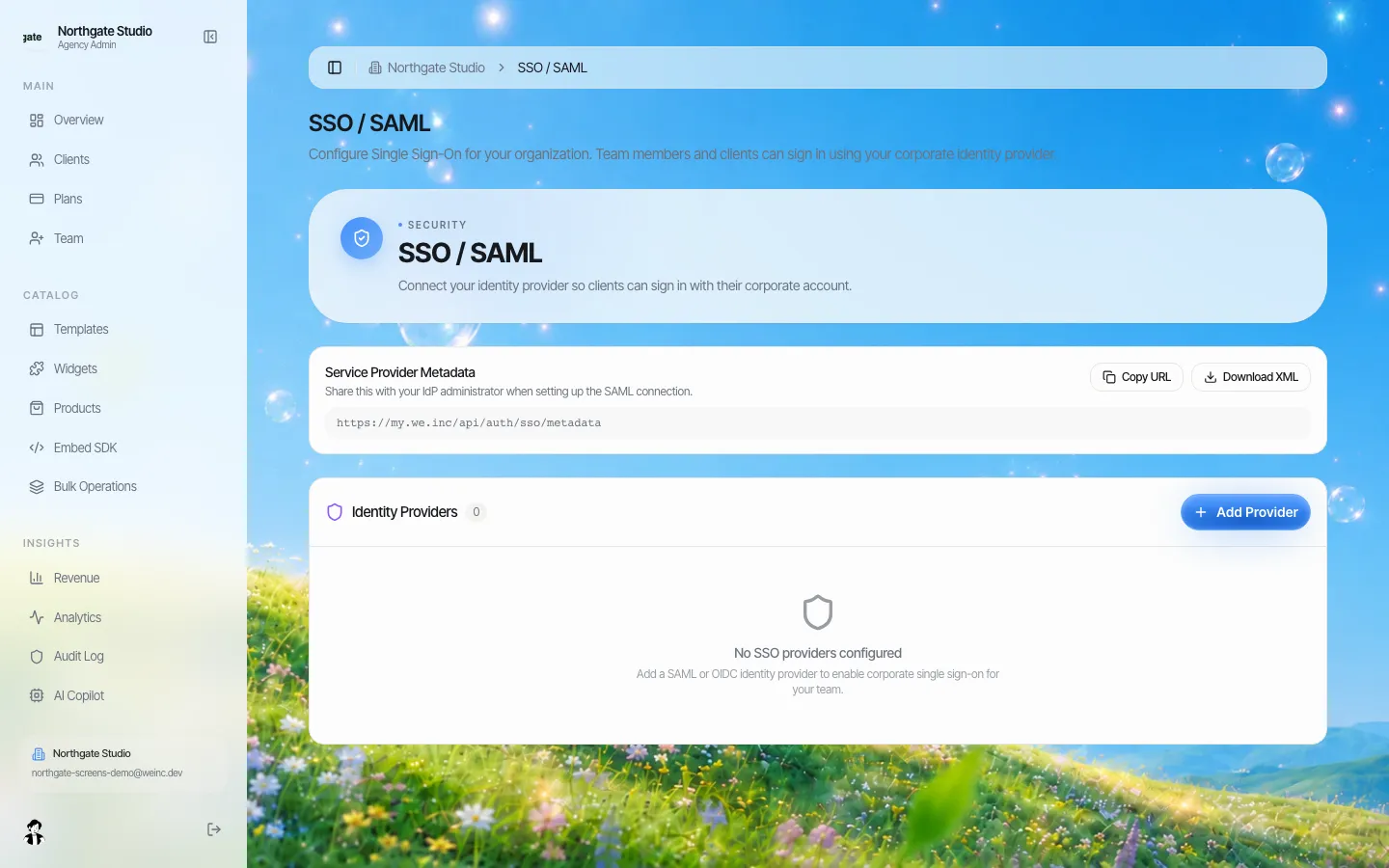
*The SSO page on a demo brand, before a provider is added.*
When it fits:
- Universities, public bodies, franchise groups and companies whose staff already have accounts in a central directory.
- Agencies whose own team should lose access the day they leave the agency directory.
Plan the rollout:
- Agree with the identity provider administrator which group of people gets access.
- Share the metadata, add the provider, test with one account.
- Tell users the sign-in change date, and keep one owner account outside the directory for recovery.
One-time login links from your own app
If your clients already sign in to something you run (a member area, a client portal, a booking system), a second password for the website editor is friction. Instead, your server asks the API for a sign-in link for that client and sends the user straight to it.
How the link behaves:
- It is created by your server with an API key; the client's email must belong to one of your clients.
- It is signed with a secret unique to your brand, and only a hash of it is stored.
- It works once and expires. You can choose the lifetime and where the client lands after sign-in.
- Every link created is written to the audit log with the client and the time.
A typical flow: the user clicks "Edit my website" in your app, your server calls the sign-in link endpoint, and the browser is redirected to the link. The user is in the editor, under your brand, without typing anything.
Do not put these links in emails that may sit unread for days, or in places where they could be forwarded. Generate them at the moment of the click.
What single sign-on does not replace
- Permissions. Signing in tells the platform who someone is; per-client switches still decide what they can do. See client permissions.
- Approvals. A client who signs in through SSO still needs your approval to publish, if you set it.
- Embedding. If you want the builder inside your product rather than on your portal, use the embed flow, which has its own short-lived sessions. See embedding a website builder in your SaaS.
Security questions buyers ask
- *Who can create login links?* Only a system holding a valid API key from the brand owner.
- *Can a link be reused?* No. A used or expired link is refused.
- *Can we see who signed in through a link?* Link creation is logged in the audit log with the client it was for.
Book a demo and bring your identity provider details or the app your clients already use; we will show the sign-in path end to end.
Book a demo. Pricing is tailored to your volume and setup, and you get your exact price on the call. 0% transaction fee.
Frequently asked questions
Does We.Inc support SAML single sign-on?
Yes. The brand console has an SSO page where you share the service provider metadata and add a SAML or OIDC identity provider, so your team and clients can sign in with corporate accounts.
Can my app sign clients into the website editor without a password?
Yes. Your server can ask the API for a one-time sign-in link for one of your clients. The link is signed, works once, expires, and is recorded in the audit log.
Is single sign-on included in every setup?
Single sign-on depends on your plan. Pricing and features are tailored, so confirm it for your setup on the demo.
Does SSO change what a client can do?
No. It only changes how they sign in. Per-client permissions and publish approval still apply.
Keep reading
- White label website builder: the We.Inc platform
- White-label website builder API
- Embed a website builder in your SaaS
- Client permissions: what each site owner can do
- Audit logs for client websites
- Branded login and sign-up pages
More in White Label
- Your best work, as a starting point for every new client
- Stop being your clients' content-entry service
- You should be able to leave. Here is exactly what leaves with you
- More sites than staff: a website platform for community colleges
- Websites for members who own the business, not franchisees who follow it
- Your members need websites. You could be the one who gives them one.
- How to create white label websites for your clients, step by step
- Custom Branding | White Label
Product
Who It's For
- For Agencies
- For Freelancers
- For Hosting Providers
- For SaaS Platforms
- For Startups
- For Financial Services
- For Healthcare
Features
Resources
- Blog
- Help Center
- Free Business Tools
- Free UI Components
- Website Templates
- Template Collections
- Website Examples
- Guides
- Comparisons
- Alternatives
- Best Lists
- Reviews
- Pricing Guides
- Use Cases
- Glossary & Guides
- Integrations
- Developers
- Benchmark
- Windows App