Choosing a white-label AI website builder: the questions that matter after the demo wow
Every AI builder looks good when a salesperson types a prompt. The problems show up in month three: a client burns through the AI allowance, a draft goes live with a broken page, or nobody can say who changed the opening hours. These nine questions are the ones we would ask any vendor, including us, with our own answers next to each.
TL;DR
- Ask who pays for the AI, and whether you can cap or switch off AI for a client.
- Ask what happens when a generated draft is broken, and whether clients can edit text without using AI at all.
- Ask about approvals, audit history and code ownership before you sign, not after the first incident.
- We.Inc answers each point below with what the product does today.
Why AI changes the white-label buying decision
With a classic drag-and-drop builder, your cost per client was mostly hosting. With an AI builder, every request a client makes has a running cost, and every draft is produced by software you did not write. That moves three risks onto you as the reseller: cost, quality and accountability. The questions below are grouped around those three.
Cost
1. Who pays for the AI your clients use?
Some platforms bundle a fixed allowance; some bill you for every request; some let you bring your own key from the AI provider. Ask which, and ask what a client sees when the allowance runs out.
On We.Inc: AI use is measured in credits, and you can set what each client plan includes. A brand can also connect its own AI provider key in the console, so usage bills to your account with that provider.
2. Can you limit AI use per client?
A client who rewrites the whole site every evening is expensive. You need a control per client, not only a global one.
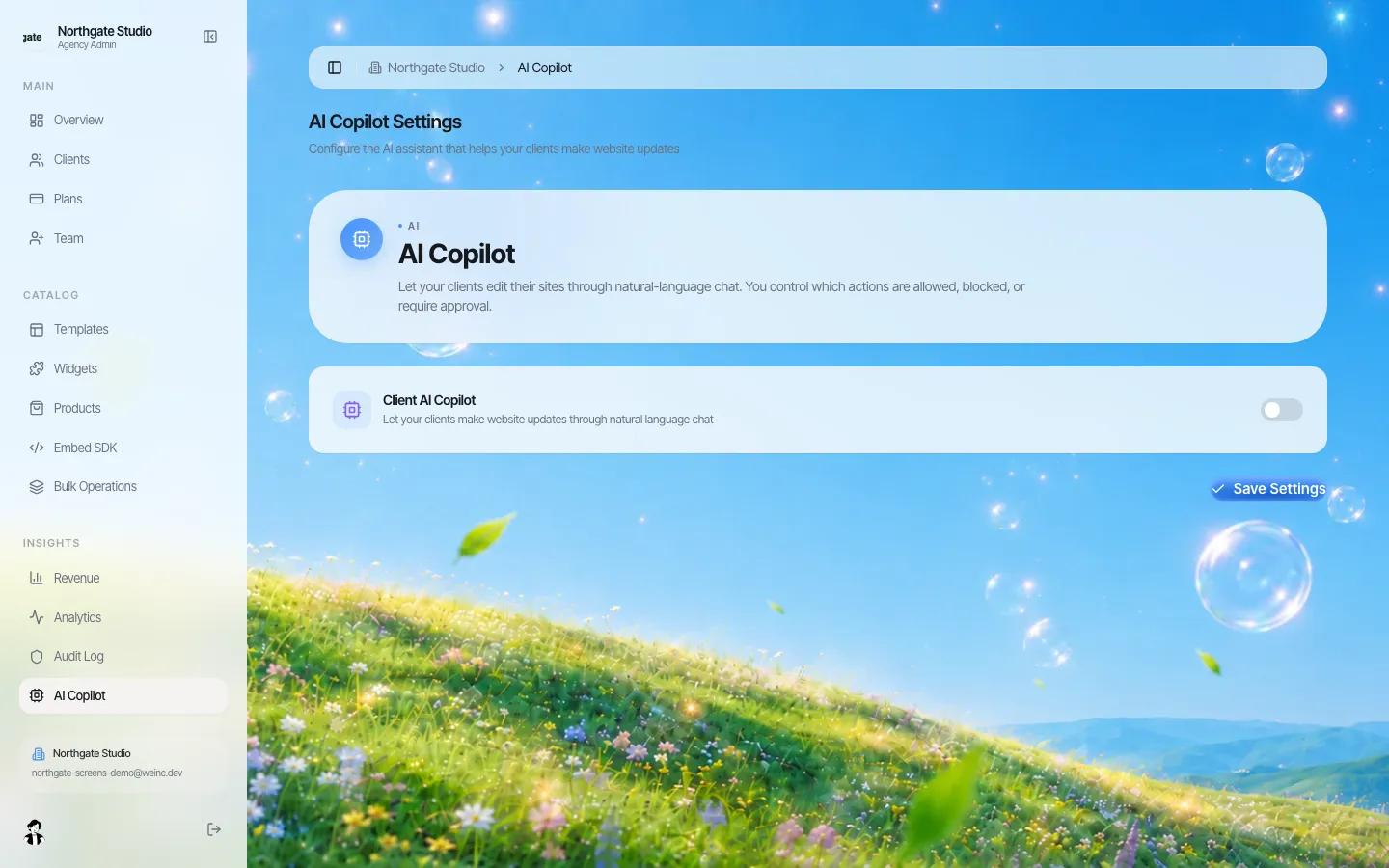
On We.Inc: credits are set per client plan, so a client on a smaller plan simply has less AI to spend. Whether clients may edit by chat at all is a brand-wide setting in the AI Copilot area of the console, and per-client controls cover the rest: publishing, code, domains, SEO tools, blog, store and forms.
Quality
3. What happens when a generated draft is broken?
AI output fails sometimes. The useful question is whether the platform notices before the client does.
On We.Inc: the first build is checked after generation, and a change that breaks the site can be rolled back automatically rather than left in place.
4. Can clients make small edits without AI?
Changing a phone number should not cost an AI request or risk a rewrite of the page.
On We.Inc: the visual editor writes text, image and style changes straight into the site's code without using credits. Asking the AI is a separate, explicit step. More on the client visual editor.
5. Can you start clients from your own designs?
Prompts from a blank page give uneven results. Agencies get better first drafts from a design they already trust.
On We.Inc: you can save your own sites or a client's site as a template, order them, and choose whether clients see built-in designs, yours first, or only yours. See the client template library.
Accountability
6. Can a client publish without you checking?
On We.Inc: publishing can be set to need your approval, per client. Their publish lands in a queue where you approve it or ask for changes.
7. Is there a record of who changed what?
On We.Inc: the brand console has an audit log for actions across your clients.
8. Who owns the code?
If the platform closes or you leave, can you take the sites with you? Ask to see an export.
On We.Inc: sites are real React and TypeScript projects. You can download one as a ZIP that builds with standard commands, or keep it in step with a GitHub repository, and you decide per client whether the client may see the code. Details: code export and no lock-in.
9. Whose name do clients see?
On We.Inc: clients sign in on your address, see your name, logo and colours, and receive emails sent in your name.
A scoring sheet you can copy
| Question | Weight | Vendor A | Vendor B | We.Inc |
|---|---|---|---|---|
| AI cost control per client | High | Per-plan credits, own key option | ||
| Broken-draft handling | High | Build check, automatic revert | ||
| AI-free edits | Medium | Visual editor, no credits | ||
| Own templates | Medium | Yes | ||
| Publish approval | Medium | Per client | ||
| Audit log | Medium | Yes | ||
| Code export | High | ZIP and GitHub | ||
| Brand on every screen | High | Yes |
Fill the empty columns during your other demos. If a vendor cannot answer a row, that is the answer.
When an AI white-label builder is the wrong choice
- Your clients need a large custom web application with its own back end and data rules; a website builder is not that.
- You sell mainly ongoing design retainers and rarely hand editing to clients. A plain hosting setup may suit you better.
- You cannot spend an hour reviewing first drafts. AI saves build time, not judgement.
Book a demo and bring two real client briefs; we will build both on the call and you can score us against the sheet above.
Book a demo. Pricing is tailored to your volume and setup, and you get your exact price on the call. 0% transaction fee.
Frequently asked questions
What is a white label AI website builder?
A platform that generates websites from a description, rebranded so your clients see your name, logo and address instead of the vendor. You resell it as your own product.
Who pays for the AI my clients use on We.Inc?
AI use is counted in credits that you include in each client plan. A brand can also connect its own AI provider key so usage bills to that account.
Can I stop clients from using AI?
Yes. Letting clients edit by chat is a brand-wide setting you control, and the credits in each client plan cap AI use. With chat off, clients still change text and images in the visual editor without using credits.
Can I check AI-built sites before the public sees them?
Yes. Publishing can need your approval for any client. The publish waits in your queue until you approve it or ask for changes.
Keep reading
- White label website builder: the We.Inc platform
- White-label AI website builder
- AI site generation for your clients
- White-label website builder for agencies
- Code export and no lock-in
- How to create white label websites for clients
More in White Label
- Chapter websites that outlast the volunteers who build them
- Who changed it, and when: the audit log, line by line
- One brand, hundreds of dealers, and a website for each
- Give business customers and members a website, under your institution's name
- Keep every site on-brand without approving every comma
- Every email your clients get, in your name
- The page your clients see most should not say someone else's name
- Brizy white label pricing, and the AI alternative
Related guides
Product
Who It's For
- For Agencies
- For Freelancers
- For Hosting Providers
- For SaaS Platforms
- For Startups
- For Financial Services
- For Healthcare
Features
Resources
- Blog
- Help Center
- Free Business Tools
- Free UI Components
- Website Templates
- Template Collections
- Website Examples
- Guides
- Comparisons
- Alternatives
- Best Lists
- Reviews
- Pricing Guides
- Use Cases
- Glossary & Guides
- Integrations
- Developers
- Benchmark
- Windows App