
The website builder made for staffing agencies.
A staffing agency website needs two clear paths from the homepage: one for employers requesting talent and one for job seekers finding work. We.inc's AI builds both, plus industry pages and application forms, from a description of your agency. AI building and editing starts on Starter at $20 a month.
Staffing agency website design has to speak to two audiences at once: companies who need workers and people who need jobs. Describe your agency and we.inc builds both paths.
Pages every staffing agency website needs
- Home: Two big buttons: 'Hire talent' and 'Find a job'. Everything else follows from which one a visitor picks.
- For Employers: Temp, temp-to-hire, and direct hire explained, with a request-staff form. Hiring managers want to know how fast you can fill a role.
- For Job Seekers: How the process works, what to expect, and a general application form.
- Industries: Light industrial, healthcare, admin, IT, whatever you specialize in. A page per industry helps search and shows depth.
- Open Jobs: Either a list you update or a link to your applicant tracking system's job board.
- About & Locations: Your branch offices, team, and history. Local staffing is still a relationship business.
Try this prompt
A website for Keystone Workforce Partners, a staffing agency in Columbus, Ohio, focused on light industrial and warehouse roles. Pages for employers with a staff request form, job seekers with an application form, industry pages for warehousing, manufacturing, and logistics, a link to our open jobs board, and our two branch offices. Professional look in navy and bright orange.
Should employers and job seekers have separate paths on the site?
Yes, split them from the first screen. Two clear buttons, one for companies that need staff and one for people looking for work, stop each visitor wading through copy meant for the other. The employer side should cover the roles and industries you fill and how quickly you can usually respond. The candidate side should show open roles, pay ranges where you can share them and how to apply.
How do I show which industries we specialise in?
Give each specialism its own short page with the job titles you place most. A hiring manager in a warehouse wants to see forklift operators and pickers, not a generic list of every sector. Mention the screening you do for that field, such as safety training checks or skills tests, and include a quote from a client in that industry if they have agreed to be named.
Search visibility for a staffing agency
A staffing site has to be found twice: by people looking for work near them and by managers who need staff quickly. Those are different searches with different pages.
Make job posts readable by job search engines
Google's job search results read JobPosting structured data from the page that holds each vacancy. Most applicant tracking systems publish that for you, so link or embed the ATS job board rather than retyping vacancies as plain text.
One page per branch, written for that town
List the employers and shift patterns typical for that office, the bus routes or parking for candidates, and the branch phone. Candidates search for work in their town, and a branch page is what matches.
Target the employer's search, not your industry jargon
Hiring managers type things like "temporary warehouse workers Columbus" or "temp to hire receptionist". Use their words on the employer pages, with how fast you usually fill a role if you can stand behind the number.
Ask placed workers and clients for reviews separately
Candidate reviews and client reviews tell different stories. Send each a direct review link at a natural moment, such as the end of a first assignment or a renewed contract, and never offer anything in exchange.
Walking through Northline Staffing Partners, an example agency site
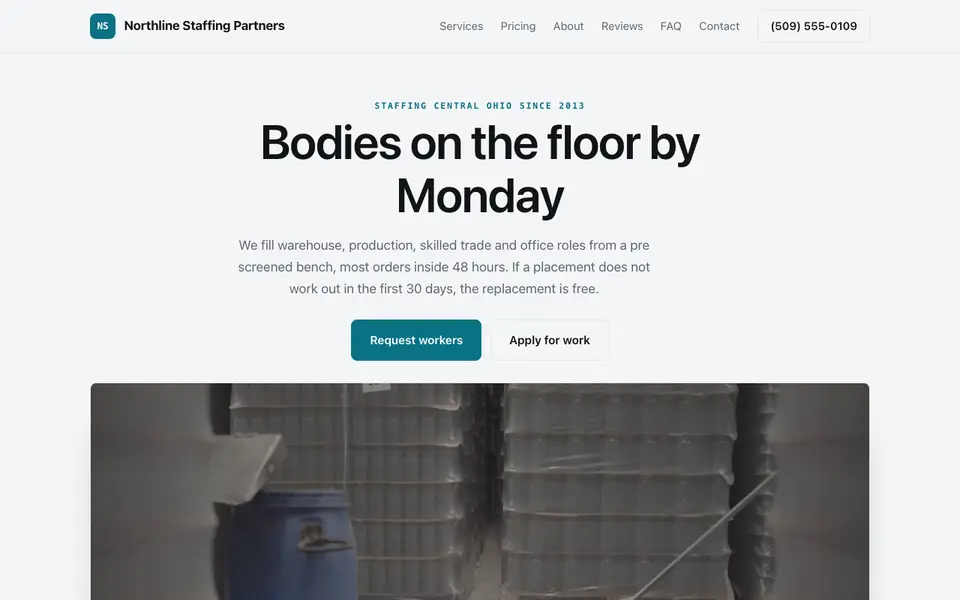
Northline Staffing Partners is an invented Ohio agency that our AI wrote from a single sentence. It shows how one site can serve two audiences at once: employers who need workers this week and people looking for shifts.
Two front doors: request workers or apply
The top of the page splits into a button for clients and a button for job seekers. Each group lands on its own form, so a plant manager never wades through candidate questions and a worker never sees billing talk.
Bill rates by role, with the markup explained
Warehouse, production, skilled trades and office roles each carry a starting hourly bill rate. The page says the markup covers payroll taxes, workers comp and unemployment, which is the first thing a buyer of temp labour asks.
Conversion and placement terms in plain view
Temp-to-hire with no fee after a set number of hours, and direct placement as a share of first-year salary, are both written out. Clients compare agencies on these terms, so hiding them only slows the sale.
Credentials checked before dispatch
For welders and electricians the example says licences and certifications are verified before anyone is sent. Licensing rules for trades differ by state, so your page should say which checks you run rather than promise a blanket standard.
Northline Staffing Partners
This is Northline Staffing Partners, a staffing agency business we described to the AI in a sentence. See the Northline Staffing Partners example site.
Start from this design
Three designs that suit a staffing agency website.
- Dark Video AI Talent Landing Page
- Glass Mosaic HR Software Hero
- Text-Led Management Consulting
Most staffing agency sites are a template with the name swapped in. Describe what you do and the AI designs and writes a staffing agency website around that business instead.
Perfect for:
- Temp staffing
- Executive recruiting
- Healthcare staffing
Split the site by audience
Employers and candidates want completely different things. Separate navigation, copy, and forms for each keeps both from bouncing.
Be careful what applications collect
Keep the site form to basics like name, contact, and role interest. Do not collect Social Security numbers, dates of birth, or other sensitive data in a plain web form; handle those in your applicant tracking system.
Follow employment advertising rules
Job postings are subject to equal opportunity and, in some states, pay transparency laws. Review your posting language against your state's requirements.
Job boards and applicant tracking need a real ATS
We.inc builds pages and forms that email you; it has no applicant tracking, job board feed, or candidate portal. Link or embed your ATS, such as Bullhorn, JobDiva, or Workable, for live job listings.
What it costs
On We.Inc you can build your site free, with no card and no trial needed to start. Starter at $20 a month adds the AI for writing employer, candidate, and industry pages, and a paid plan lets you connect your own domain for around $10 to $20 a year. Your ATS is a separate cost.
Building your site is free, no card needed. Paid plans from $20 a month. Compare plans
Frequently asked questions
What makes good staffing agency website design?
Two clear paths for employers and job seekers, industry pages that show your specialties, and short forms for each audience. Branch locations and a real team help too.
Can I post jobs on my we.inc site?
You can list jobs as pages and ask the AI to update them. For a live, searchable job board with applications, link your applicant tracking system's careers page.
Can candidates upload resumes?
Resume uploads are best handled by your ATS, which stores them securely. Link its application page from your site.
Is there a free plan?
Yes. New We.Inc accounts can build a site free, with no card needed to start; paid plans start on Starter at $20 a month.
Can I have pages for each branch office?
Yes. The AI can create a page per location with address, phone, and the industries that branch serves.
Does this work for a solo recruiter?
Yes. A solo recruiter or small search firm can run a short site: the roles you fill, how your fee works and a form to open a search. The Halstead sample on this page is laid out that way.
How is a recruiter website different from a staffing agency website?
A recruiting firm mostly sells to hiring companies, so it leads with fees and how a search works. A staffing agency also needs a busy candidate side, with an apply button next to the employer one.
Recruiter and staffing agency website design: three sample sites, compared
A recruiting website serves two audiences at once: employers who need people, and people who need work. Below, three sample sites from our library, a staffing agency, a recruiting firm and an event staffing agency, read for both sides.
How these were picked
Staffing, recruiting and event staffing samples from our library. All three businesses, their fees, numbers and reviews are made up. Checked 27 September 2026. Every design here is from the We.Inc library and is labelled as a sample or template. None is a customer site, and no entry claims results.
1. Northline Staffing Partners
Sample site built by our AI (made-up business). Open it
Task: An agency placing warehouse, trade and office workers.
Design choice: "Request workers" and "Apply for work" side by side up top, billed hourly rates per role, temp to hire terms and a direct placement fee.
Limitation: No job list. Link your applicant tracking system's job board.
2. Halstead Talent Partners
Sample site built by our AI (made-up business). Open it
Task: A recruiting firm filling sales, finance and operations roles.
Design choice: "Open a role" and "See our fees", with contingency, retained, contract and volume hiring priced, and a free compensation benchmark.
Limitation: Employer side only. Add a candidate page if you want applications.
3. Rally Point Event Staffing
Sample site built by our AI (made-up business). Open it
Task: An agency staffing trade shows and events.
Design choice: "Request staff" and "Apply to work", hourly rates per role with a minimum, and an emergency same day fill rate.
Limitation: Events only.
Task comparison
| Design | Employer requests staff | Fees shown | Candidate applies |
|---|---|---|---|
| Northline Staffing Partners | Request workers | From $19.50/hour billed | Apply for work |
| Halstead Talent Partners | Open a role | 20% of first year salary | No |
| Rally Point Event Staffing | Request staff | From $29 per hour | Apply to work |
Walkthrough: a plant supervisor on the Northline sample
- They land on "Bodies on the floor by Monday" with "Request workers".
- "Temp, temp to hire and direct placement" shows billed rates per role and says what the markup covers.
- The replacement terms and temp to hire conversion are stated before they call.
- Edit prompt: "Add an employer request form with role, headcount, shift, start date and site address, and a Jobs link to my applicant tracking system."
Copyable build brief
A website for [agency], a [staffing / recruiting] firm in [area] for [industries]. Separate paths for employers and job seekers. Roles and industries you fill. How fees work. An employer request form. A link to your job board for applications. Branch pages if you have more than one office.
What We.Inc does and does not do here
| Job board and applicant tracking | Not built in. Link your applicant tracking system's careers page. |
| Resume upload | Best handled by your applicant tracking system. Link its application page. |
| Publishing for free | New We.Inc accounts can build a site free, with no card needed to start. No AI credits and no custom domain. |
| Having the AI write and change the site | Paid plans: Starter $20/mo, Pro $49/mo, Max $99/mo. You describe the business, then edit by clicking or by asking in chat. |
| Your own domain | Paid plans only. |
| Taking payments | Through your own Stripe account, so the money goes to you. We.Inc does not hold funds. |
| Forms | The AI builds contact and request forms. A synced booking calendar is not built in: link the scheduling tool you already use. |
What to adapt
- Two buttons: one for employers, one for candidates.
- How fees work, in plain words.
- Industries you actually fill.
What not to copy
- The sample fill rates and placement numbers.
- Collecting sensitive personal data in a plain web form.
Questions
What makes good recruiter website design?
Two clear paths, one for hiring companies and one for candidates, a plain explanation of fees, the roles or industries you fill, and short forms for each side. The Halstead sample shows fees by hiring model; the Northline sample puts both buttons side by side.
Can I build a recruiting website without a developer?
Yes. Start from a template on the free plan, or describe your firm on a paid plan and the AI builds the pages and forms. Live job listings come from your applicant tracking system, linked from the site.
Start from a suitable design
Start building this recruiting website. Or check costs with the website cost calculator, test a current site with the website grader, and see pricing.
Related industries and website guides
- freelance website builder
- small business website design
- coaching website builder
- realtor website builder
- tax preparation services website builder
- virtual assistant websites
- staffing agencies website examples
- Best website builders for staffing agencies
Related website builders: Professional Services
- freelance website builder
- small business website design
- coaching website builder
- realtor website builder
- tax preparation services website builder
- virtual assistant websites
Before you start
- staffing agencies website examples
- Best website builders for staffing agencies
- how to make a website
- free website builder
- AI website builder
Product
Who It's For
- For Agencies
- For Freelancers
- For Hosting Providers
- For SaaS Platforms
- For Startups
- For Financial Services
- For Healthcare
Features
Resources
- Blog
- Help Center
- Free Business Tools
- Free UI Components
- Website Templates
- Template Collections
- Website Examples
- Guides
- Comparisons
- Alternatives
- Best Lists
- Reviews
- Pricing Guides
- Use Cases
- Glossary & Guides
- Integrations
- Developers
- Benchmark
- Windows App